
Web Design Blog
Why Is My Business Not Showing Up on Google Maps? Solving the Mystery of Local Invisibility
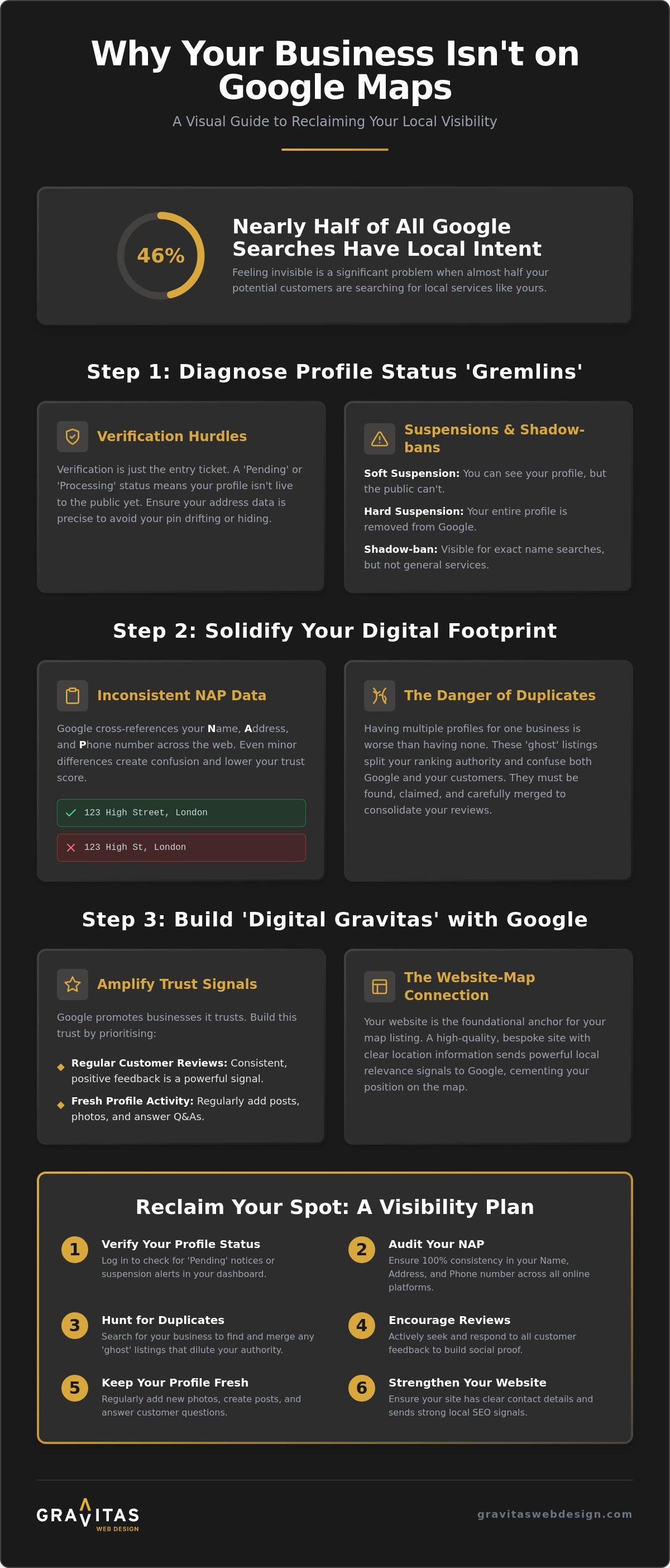
You’ve spent hours meticulously filling out every detail of your profile, yet when you search for your services, your business is nowhere to be found. It feels a bit like throwing a party and forgetting to send the invitations, doesn’t it? You’re left staring at a screen, wondering, why is my business not showing up on Google Maps whilst your competitors bask in the glory of the local pack. It’s a punch to the gut to feel invisible, especially when 46% of all Google searches have local intent. Watching leads slip away to the shop down the road (who probably doesn’t even offer a better service) is enough to keep any business owner up at night.
We completely understand that sinking feeling of being digitally hidden. The good news is that you don’t have to stay a ghost. Discover the specific reasons why your business pin remains hidden and learn the exact steps to reclaim your spot on the local map. We’ll walk you through the technical requirements and show you how to build the digital gravitas needed to rank. From verification hiccups to the role of bespoke web design in local SEO, we’re covering the path to making your business the local favourite it deserves to be.
Key Takeaways
- Learn how to spot “status gremlins” like pending or suspended profiles that keep your pin hidden from public view.
- Understand why is my business not showing up on Google Maps by auditing your digital footprint for inconsistent NAP data and confusing duplicate listings.
- Discover how to build digital “gravitas” with Google by prioritising regular customer reviews and fresh profile activity.
- See why a high-quality, bespoke website acts as the essential foundation for your map ranking by sending the right local signals.
- Get a straightforward, step-by-step visibility plan to tidy up your online presence and start appearing in the local pack.
The Invisible Pin: Why Your Business Isn’t on the Map Yet
Imagine you’ve just polished your storefront windows, hung the sign, and opened the doors, only to find that the street outside has been boarded up. That’s essentially what happens when your Google Business Profile (GBP) exists in the dashboard but doesn’t appear to the public. Many owners ask, why is my business not showing up on Google Maps even after they’ve received that little postcard in the mail. The truth is, verification is just your entry ticket to the stadium; it doesn’t mean you’re actually on the pitch playing the game.
Google is a bit of a perfectionist. If it thinks your profile is a bit thin or lacks credibility, it might simply filter you out of the main view to keep the user experience clean. It’s not personal, but it certainly feels like it. Think of your GBP as your digital shopfront. If the windows are empty and the lights are off, Google won’t invite people inside. Understanding Local SEO is vital here, as it’s the invisible force that pushes your pin from the background into the spotlight. Without it, you’re just another unread entry in a very large phonebook.
The Verification Hurdle
Checking your status is the first port of call. Log into your dashboard and look for those pesky labels: ‘Pending’, ‘Processing’, or ‘Verified’. In the UK, verification methods have become significantly stricter lately to stop the tide of digital spam. Sometimes, even after you’ve jumped through the hoops, your pin might drift to a nearby street or hide behind a larger building’s icon. This happens when your address data isn’t quite as crisp as Google’s algorithm requires. If your pin isn’t exactly where it should be, customers won’t find you, even if they’re standing right outside.
Status Check: Suspensions and Shadow-bans
If you’re still wondering why is my business not showing up on Google Maps, you might be dealing with a suspension. A soft suspension means you can see your profile in the dashboard, but it’s gone from the public eye. A hard suspension is more serious; your entire account is essentially removed from the index. Common pitfalls include:
- The ‘Prohibited Content’ trap: Google has recently tightened its belt on review policies. If you’ve been asking staff to be named in reviews or using on-site tablets to gather feedback, you might have triggered a red flag.
- Shadow-bans: This is a frustrating scenario. Your profile is technically live, but you only show up if someone types your exact business name. If they search for your service generally, you’re invisible. This usually happens when Google doesn’t trust your location data or thinks your profile lacks the necessary digital authority.
Sorting Out the Basics: Consistency and Local Signals
Think of Google as a very busy, slightly irritable librarian. If you tell her you’re based at ’12 High Street’ on your website, but ’12 High St.’ on a directory, and ‘Unit 12, High Street’ on your Facebook page, she’s going to get a headache. When she’s confused, she simply stops recommending you. This is the core of the ‘NAP’ rule: Name, Address, and Phone number. Consistency is absolutely non-negotiable. If you’ve moved premises or changed your business name recently, you’ve likely left a trail of digital breadcrumbs that lead nowhere. This confusion is a massive reason why is my business not showing up on Google Maps as it should.
Google essentially cross-references your profile against the rest of the web. If the data doesn’t match, your trust score drops. This is why optimizing for local SEO involves a fair bit of digital house-cleaning. You also need to be wary of virtual offices or P.O. boxes. Google wants to see a real, physical location where customers can actually visit or where you genuinely operate. If you’re using a fancy virtual address in London whilst actually working from your kitchen table in Sutton Coldfield, Google might just hide your pin to protect its users from a poor experience. If this all feels like a lot of digital detective work, you can always organise a professional audit to get things straightened out.
The Danger of Duplicate Listings
Having two profiles is actually worse than having none at all. It splits your “ranking juice” and confuses the algorithm. These ‘ghost’ listings often pop up when third-party directories automatically create profiles with old data. You’ll need to find these, claim them, and then follow the proper steps to merge them into your primary account. This ensures you don’t lose your hard-earned reviews whilst cleaning up your reputation in Google’s eyes.
Service Area vs. Physical Location
If you’re a ‘hybrid’ business, you face a unique dilemma. You might have a physical shop in Lichfield but also serve customers in Birmingham. If you set your service area radius too wide, Google might think you’re trying to game the system. Be honest about where you actually go. Being too greedy with your service area often leads to a visibility drop because Google prefers to show local results that are highly relevant to the searcher’s specific location.
Building Gravitas: Trust Signals That Google Loves
Think of your Google Business Profile as a first date. You’ve turned up on time (verification) and you’re wearing matching socks (NAP consistency), but if you sit there in stony silence, there won’t be a second meeting. Google needs to see that you’re alive, kicking, and actually liked by the locals. This is what we call digital gravitas. If you’re still scratching your head and asking, why is my business not showing up on Google Maps, the answer often lies in your engagement levels. Google is far more likely to recommend a business that is active and adored than one that hasn’t posted a photo since the dial-up era.
Engagement isn’t just a vanity metric. It’s a signal of reliability. Research shows that 88% of consumers trust online reviews as much as personal recommendations, and Google’s algorithm is designed to mirror that human behaviour. If your competitors are racking up fresh feedback whilst your profile gathers digital dust, you’ll naturally slide down the rankings. It’s about proving to the algorithm that you’re a safe, high-quality bet for its users. Responding to every review, even the grumpy ones, shows you’re a real human who cares about their reputation.
The Review Strategy
Reviews are the lifeblood of your map ranking, but it’s not just about the star count. The actual words your customers use matter immensely. When a client mentions your specific services, like “bespoke web design” or “Search Engine Optimisation”, it helps Google categorise your expertise. Don’t worry about sounding like a desperate salesperson; simply ask happy customers for their honest thoughts. Be aware of the strict ‘Review Filter’ though. Google has recently cracked down on review gating and the use of on-site review stations. If you’re caught pre-screening customers or using tablets in your shop to solicit feedback, those hard-earned ratings might never see the light of day.
Visual Proof and Engagement
Photos are your proof of life. Please, for the love of all things digital, bin the stock imagery of people shaking hands. Customers want to see your actual team, your office in Sutton Coldfield, or your latest project in Birmingham. Real, gritty photos convert because they build genuine trust. Beyond imagery, use Google Updates to share news or offers. It keeps your profile ‘fresh’ in the eyes of the algorithm. Also, don’t ignore the Q&A section. It’s a hidden SEO goldmine. By answering common questions yourself, you’re providing more context for Google to chew on, which directly helps when you’re wondering why is my business not showing up on Google Maps for specific local search terms.
The Secret Link: How Your Website Impacts Your Map Ranking
Most business owners think their Google Business Profile and their website are two completely separate islands. They aren’t. They’re more like a set of lungs; if one isn’t working, the whole system struggles to breathe. If you’ve ever wondered why is my business not showing up on Google Maps, the culprit might actually be hiding in your website’s code rather than your map dashboard. Google looks for a “handshake” between your profile and your site. If your website feels like a dusty, slow relic from the early internet, Google will hesitate to send its users your way. It wants to recommend businesses that provide a smooth, reliable experience from the first click to the final enquiry.
Linking your profile to a generic, clunky template is a bit like putting a high-performance engine into a cardboard box. It just doesn’t work. A bespoke website provides the solid foundation needed to broadcast your location to the world. You also need to consider where you’re actually sending people. Should you link to your homepage or a specific location page? If you’re a single-site firm in Sutton Coldfield, the homepage is usually fine. However, if you’re targeting multiple areas like Birmingham and London, a dedicated, optimised location page is often the better shout. It gives Google a clear, unambiguous signal of exactly where you operate.
On-Page SEO for Local Maps
Integrating your location naturally into your bespoke web design is about more than just slapping a postcode in the footer. It involves using Schema Markup, specifically Local Business JSON-LD, to give Google a clear, machine-readable map of your business details. Your website content must also mirror the services you’ve ticked on your map profile. If you claim to be an expert in Search Engine Optimisation on the map but your website only talks about logo design, Google’s “trust alarm” starts ringing. Consistency across both platforms is what builds the digital gravitas needed to rank.
Speed, Security, and Trust
Google is fiercely protective of its users. It won’t promote a business that forces people onto a ‘Not Secure’ site or one that takes an age to load on a mobile phone. This is where WordPress maintenance becomes your best friend. Keeping your site fast and secure isn’t just about preventing hacks; it’s about maintaining that precious map position. If users click through to your site and immediately bounce back because it’s too slow, Google notices that behaviour. High dwell time signals that you’re a helpful, relevant result. If your current site is more of a hurdle than a help, it’s time to get your digital foundation sorted.
Reclaiming Your Spot: A Step-by-Step Visibility Plan
Right, we’ve diagnosed the symptoms, now let’s talk about the cure. If you’re still muttering why is my business not showing up on Google Maps into your morning tea, it’s time to stop wondering and start acting. Visibility isn’t a “set and forget” project. It’s more like a garden; if you don’t pull the weeds of inconsistent data and water the soil with fresh content, things start to wither. The goal isn’t just to exist on the map. It’s to dominate the ‘Local Pack’, those top three spots that capture 70% of the clicks. Getting there requires a mix of technical tidiness and genuine digital authority.
Cleaning up your digital footprint is the first major hurdle. You need to ensure that every directory, from Yell to local Birmingham or London business listings, tells the exact same story. If Google finds conflicting information, it gets nervous and hides your pin. Once the basics are sorted, you can focus on building the kind of gravitas that makes the algorithm sit up and take notice. If you’re managing several sites and the technical load feels a bit much, it might be time to have a pro organise your local SEO strategy so you can get back to actually running your business.
The 5-Minute Visibility Audit
Start with a quick gut-check. Open an ‘Incognito’ or private browser window to search for your services. This gives you an unbiased view, free from your own search history. Does your pin appear? If not, check your primary category in your dashboard. If you’re a plumber but you’ve accidentally listed yourself as a general contractor, you’re shouting into the wrong void. Finally, test your website link on a mobile device. Since over 65% of local searches happen on mobile, a slow or clunky site will get you demoted faster than a bad review.
Your Path to Dominating Local Search
Consistency is your secret weapon. Build a simple schedule to upload fresh photos of your work in Sutton Coldfield or your latest team meeting in the office. This activity signals to Google that you’re an active, reliable business. Don’t forget to track your ‘Map Insights’ either. This data tells you exactly how people are finding you and what they do once they see your pin. For many firms, moving from invisible to invincible requires a more aggressive approach. Investing in professional SEO for service businesses is often the fastest way to climb the rankings and stay there, ensuring you’re never the best-kept secret in your town again.
Stop Hiding and Start Growing
Solving the mystery of your missing pin doesn’t require a degree in rocket science, but it does demand a bit of digital elbow grease. We’ve seen how everything from a cheeky duplicate listing to a sluggish website can keep you in the shadows. Asking why is my business not showing up on Google Maps is the first step toward fixing a broken digital shopfront and reclaiming those local leads. Your map visibility is a reflection of your overall digital health; it’s about consistency, regular engagement, and a website that Google actually trusts.
At Gravitas Web Design, we specialise in bespoke web design that drives local enquiries and helps firms in Sutton Coldfield, Birmingham, and London stand out. We take a candid, human approach to complex digital problems, ditching the jargon for real results. You’ve worked too hard on your business to remain the best-kept secret in town. It’s time to shine a light on your hard work and get that pin exactly where it belongs.
Stop being the best-kept secret in Birmingham; let’s get your business on the map.
Frequently Asked Questions
How long does it take for a new business to show up on Google Maps?
It typically takes a few weeks for a new business to fully appear in search results after verification is complete. Whilst the postcard might arrive within five to seven days, Google’s algorithm needs time to digest your data and decide where you fit amongst local competitors. Don’t panic if you aren’t top of the pile on day one; building digital authority is a marathon, not a sprint.
Why can I see my competitors on the map but not my own business?
Your competitors likely have stronger trust signals, such as more frequent reviews or a better-optimised website. If you’re asking why is my business not showing up on Google Maps whilst the shop next door is, it usually comes down to prominence. Google favours businesses that are active and have a solid digital foundation. The competition for those spots is fierce, so activity is key.
Does my business need a physical shopfront to be on Google Maps?
You don’t need a physical shopfront to have a presence on the map. You can register as a “Service Area Business,” which allows you to hide your home address whilst still appearing for searches in your local area. This is a lifesaver for plumbers, electricians, and consultants who visit clients rather than hosting them at a specific centre.
Can I show up on Google Maps if I work from home in Birmingham?
Yes, you can absolutely show up if you work from home in Birmingham. You simply set your service area to cover the specific postcodes or radius you serve. It’s a brilliant way to capture local interest without needing a high-street office. This ensures you still appear for customers searching for services in your immediate vicinity.
Will changing my business name on Google Maps help my ranking?
Changing your business name to include keywords is a risky move that often leads to a suspension. Google wants to see your real-world name. Stick to what is on your signage and official documents. Trying to game the system might give a tiny temporary boost, but the long-term risk of being wiped off the map entirely just isn’t worth the gamble.
What should I do if my Google Business Profile is suspended?
If your profile is suspended, you must first identify the policy violation before submitting an appeal. Common culprits include the rules against soliciting staff mentions or using on-site review stations. Once you’ve tidied up the issue, use the official appeal tool to ask Google for a second look. It’s a bit of a bureaucratic hoop, but it’s the only way back.
How do I get my business into the ‘Top 3’ Local Pack results?
Getting into the ‘Top 3’ requires a blend of high-quality reviews, proximity to the searcher, and a fast, bespoke website. Google uses relevance, distance, and prominence to decide who wins. Focus on gathering fresh feedback and ensuring your website sends the right local signals to the algorithm. This is how you move from being a ghost to being the first choice for local customers.
Do I need to pay Google to be visible on the map?
No, you do not need to pay Google to appear in the organic map results. A Google Business Profile is a free tool. Whilst you can pay for Local Services Ads to appear at the very top, the standard map pin and local pack rankings are earned through good SEO and genuine customer engagement. It’s about merit, not just the size of your wallet.