
Web Design Blog
Why Isn’t My Business on Google Maps? Guide for Local Firms
Imagine you’ve just spent weeks perfecting your new office in Sutton Coldfield, only to realise that when your neighbours search for your services, you’re a total digital ghost. You open your phone, type in your trade, and wait. Your competitors are all there, practically preening with their pins on the map, while you’re left staring at a blank space. It’s enough to make any business owner want to bin their router. You’re likely asking the same frustrating question as everyone else: why is my business not showing up on Google Maps?
It’s a common headache, and honestly, it feels a bit like being the best-kept secret in Birmingham when you’d much rather be the busiest. We get it. The technicalities of local SEO can feel like a maze designed by someone who hates sunshine. But here’s the good news. You’re about to discover the exact reasons your business is currently invisible and, more importantly, the practical steps to fix it. We’ll break down the three pillars of ranking and give you a step-by-step plan to reclaim your spot on the map, ensuring your local leads stop wandering off to the competition.
Key Takeaways
- Learn why simple verification isn’t enough and how to bridge the gap between having a profile and actually being found by the public.
- Uncover the logic behind Google’s local algorithm to finally answer why is my business not showing up on Google Maps for your local customers.
- Discover how tiny inconsistencies in your name, address, or phone number can confuse search engines and tank your local credibility.
- Understand the tether between your website’s health and your map position, including why slow hosting makes your business invisible.
- Get a jargon-free action plan to move from being a local secret to a high-ranking firm that captures leads in your specific town.
The Immediate Culprits: Why Your Business Is Missing from Google Maps
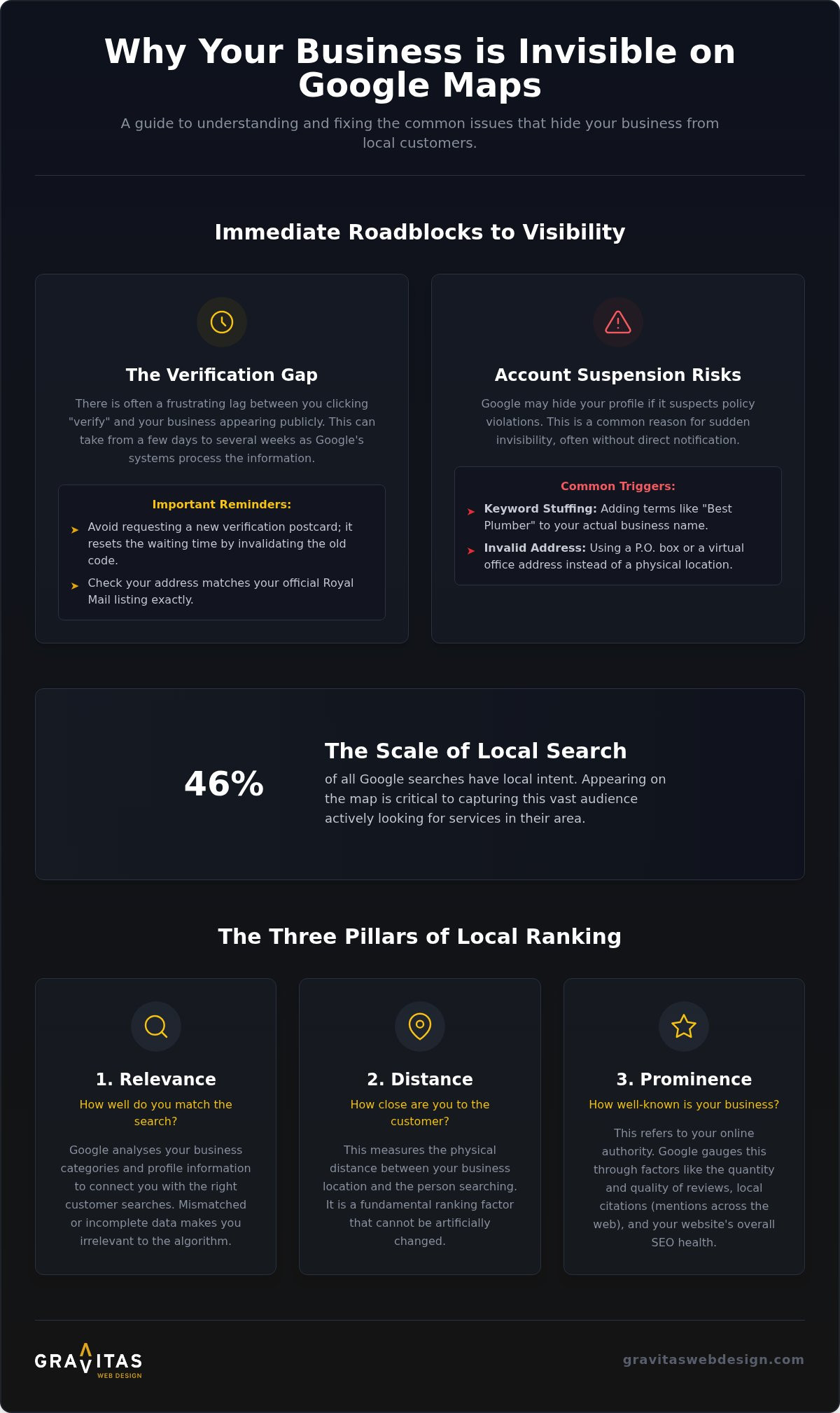
Visibility on Google Maps isn’t just about having a login or a filled-out profile. For a local firm in Birmingham or London, true visibility means your business pin is public, searchable, and actively appearing when a potential customer looks for your services. If you’ve been scratching your head wondering why is my business not showing up on Google Maps, the answer often lies in the “Verification Gap”. This is that awkward period where Google knows you exist, but it hasn’t quite decided to let the rest of the world in on the secret yet. Getting to grips with Understanding Local SEO is the first step toward realising that a map pin is a badge of trust, not a right of passage.
There is often a frustrating lag between you clicking “verify” and that red pin actually appearing for the public. Google’s systems can take anywhere from a few days to a couple of weeks to index your new status. It’s a bit like waiting for the paint to dry on a new shop front; you’re technically open, but you’re still waiting for the “Open” sign to be lit up by the algorithm.
Verification Status and Postcard Delays
For many UK businesses, the physical postcard is the primary hurdle. We’ve seen clients in Sutton Coldfield and Lichfield wait weeks for that little bit of card to arrive via Royal Mail. If your status is stuck in “Pending”, don’t keep requesting new codes. Every time you ask for a new postcard, the previous code becomes useless, effectively resetting your wait time. To check if you’re actually “Live”, search for your exact business name and city in an Incognito window. If your profile appears in the sidebar but not on the map itself, you’re likely just caught in the processing queue.
- Check your Google Business Profile dashboard for any “Action Required” banners.
- Ensure your address matches your official Royal Mail listing exactly.
- Avoid changing your core details whilst the verification is being processed.
Account Suspensions and Policy Violations
Sometimes, the reason you’re invisible is that Google has quietly put you in the digital “naughty corner”. Account suspensions are common and usually triggered by red flags that suggest your business isn’t legitimate. A classic mistake is “keyword stuffing” your business name. If your firm is called “Smith & Sons”, but you’ve listed it as “Smith & Sons Best Plumbers Sutton Coldfield Rapid Fix”, Google will likely hide your profile for being spammy.
Another major trigger is using a virtual office or a P.O. box. Google wants to see a physical location where customers can actually turn up. If you’re using a fancy London mailing address but actually work from your spare room in Lichfield, the algorithm will eventually sniff out the inconsistency. Appealing these suspensions requires radical transparency; you’ll need to provide utility bills or business licences that prove you are who you say you are, where you say you are. It’s a bit of a faff, but it’s the only way to win back your spot on the map.
Understanding the Three Pillars of Local Ranking: Relevance, Distance, and Prominence
Google doesn’t just pull names out of a hat. When you’re staring at your screen and wondering why is my business not showing up on Google Maps, it’s usually because you’re missing the mark on one of the three tests the algorithm sets. These are relevance, distance, and prominence. With 46% of all Google searches having local intent, failing these tests means you’re missing out on nearly half of your potential audience. Think of these pillars as the three legs of a stool. If one is shorter than the rest, the whole thing topples over.
Distance is the most straightforward factor, yet it’s often the most frustrating. It simply measures how far your business is from the person searching. If someone is standing in the centre of Lichfield looking for a coffee shop, Google will show them the shops on that street before it shows yours three miles away. You can’t cheat physics. You certainly can’t move your shop every time someone searches from a new location. This is why local visibility can vary wildly depending on whether your customer is in Sutton Coldfield or just across the border in Birmingham.
Relevance: Does Your Profile Match the Searcher Intent?
Relevance is about how well your profile matches what someone is actually looking for. It’s not enough to select a broad category and hope for the best. Google looks at your primary and secondary categories to decide if you’re the right fit. If you’re a bespoke web design firm but you’ve only listed yourself as a general “internet shop”, you’re invisible to the people who need you most. Your services list should be a detailed menu of what you offer, not a vague summary. A clear, punchy business description helps Google connect the dots between a user’s problem and your solution.
Prominence: Building Digital Authority Beyond the Map
Prominence is essentially a digital popularity contest. Google wants to see that other people trust you before it recommends you. This trust is built through your reviews, your ratings, and your general standing across the web. If your competitors have dozens of five-star reviews and you’re sitting on a handful from years ago, the algorithm will prioritise them every time. Prominence is Google’s way of rewarding businesses that have earned their reputation.
Building this authority isn’t just about what happens on the map itself. Your website needs to be doing the heavy lifting in the background. Effective SEO for service businesses acts as the engine for your prominence. It signals to Google that you’re a credible, authoritative voice in your industry, which naturally pushes your pin higher. If you’re tired of being a hidden gem in Sutton Coldfield, you might want to chat with us about your options.
NAP Consistency and the Power of Local Citations
Think of Google as a digital detective. Before it grants you a prime spot on the map, it goes out and “fact-checks” your business against the rest of the internet. It scans hundreds of third-party sites to verify your Name, Address, and Phone number (NAP). If your business is listed as “The Coffee House” on Google, but “The Coffee House Ltd” on Yell and “Coffee House Sutton” on Facebook, Google gets suspicious. When Google gets confused, it gets cautious. This lack of certainty is a primary reason why is my business not showing up on Google Maps. If the algorithm isn’t 100% sure where you are or what your name is, it won’t risk its reputation by recommending you to a local searcher.
For firms in competitive hubs like Birmingham or London, these tiny discrepancies act like digital anchors. They weigh down your rankings whilst your competitors, who have kept their data tidy, sail past. A citation audit isn’t just a “nice to have” task; it’s a fundamental part of proving you are a legitimate, trustworthy local entity.
Essential British Directories for Local SEO
Whilst it’s tempting to think that only Google matters, the algorithm relies heavily on established UK directories to confirm your location. Listings on Yell, Thompson Local, and Scoot still carry significant weight in the UK market. They act as “votes of confidence” for your physical presence. If you’re in a trade, industry-specific sites like Checkatrade or TrustATrader are even more vital. Google sees a consistent listing on these platforms as proof that you’re an active part of the local economy.
You also need to watch out for “Ghost Listings”. These are outdated profiles from previous business owners or former tenants of your office space. If a plumber used to work from your current unit in Lichfield, their old NAP data might still be floating around, confusing Google and hiding your new business pin. Finding and claiming these old listings is essential to clearing your path to the top of the map.
Managing Your Data Across the Web
Consistency needs to be absolute. Your website footer is often the first place Google looks to verify your details, so it must match your Google Business Profile exactly (down to the way you write “St.” versus “Street”). Use this simple checklist to keep your data in line:
- Ensure your phone number uses the same format across all social media profiles.
- Check that your postcode is 100% accurate on every directory you’ve joined.
- Remove any old office addresses from your “About Us” pages or contact forms.
The straight-talking truth is simple: if Google is confused by your data, you are invisible to your customers. Tidying up your citations might feel like digital housework, but it’s the only way to ensure your business pin finally stays where it belongs.
The Hidden Link: How Your Website Health Affects Your Map Position
Imagine a potential client standing in a soggy car park in Sutton Coldfield, desperately trying to find your contact details on their phone. If your website takes an age to load or looks like a jumbled mess on their screen, they’re going to click away faster than you can say “lost lead”. This is where many local firms get tripped up. They treat their map listing like a separate entity (a digital island, if you will), but in reality, Google Maps is tethered to your website. If your digital home is in disrepair, it’s a major reason why you might be left wondering: why is my business not showing up on Google Maps?
Google wants to recommend businesses that provide a stellar user experience. If your site is slow or non-responsive, the algorithm views you as a risky bet. This is where bespoke web design makes all the difference. Unlike clunky templates that are bloated with unnecessary code, a custom-built site provides the lean, high-performance foundation that Google craves. For businesses serving multiple areas like Lichfield, Sutton Coldfield, or London, having dedicated local landing pages is also vital. These pages tell Google exactly where you operate, making your map pin much more likely to appear for searchers in those specific spots.
Mobile-Friendliness and Local Search
Most Google Maps searches happen on mobile devices whilst people are actually on the move. If your site isn’t optimised for a small screen, your bounce rate will skyrocket. This signals to Google that your business isn’t a top-tier result. You need a site that works flawlessly on a smartphone, complete with clear “Click-to-Call” buttons that make it effortless for a customer to reach you. If you make people work too hard to find your number, they’ll simply move on to the next pin.
Technical SEO: The Engine Under the Bonnet
Think of technical SEO as the engine that powers your local authority. Factors like site speed and secure hosting (HTTPS) are essential signals that tell Google your business is professional and reliable. You also need Schema Markup; this is a bit of behind-the-scenes code that helps search engines understand your specific “Local Business” data. Keeping these technical signals strong requires ongoing website maintenance to ensure nothing breaks as the web evolves. If you’re ready to stop being a “best-kept secret” and want a site that actually supports your map ranking, book a chat with our team today.
Moving from Invisible to Ubiquitous: Your Local SEO Action Plan
So, you’ve identified the gremlins in the system. You’ve stopped asking why is my business not showing up on Google Maps and started looking at the solution. Moving from a total digital ghost to a ubiquitous local fixture doesn’t happen by accident. It is the result of a deliberate, ongoing strategy that treats your map listing as a living part of your business, not just a dusty profile you set up once and forgot about. The journey from “Hidden” to “High-Ranking” is essentially a transition from being a static listing to becoming a dynamic local authority.
To keep your pin at the top, you need to monitor your progress using Google Business Profile Insights. This dashboard is your secret weapon. It tells you exactly how people find you, whether they are calling you directly from the map, or if they are clicking through to your site to check out your credentials. If those numbers aren’t climbing, it’s a sign that your profile needs a bit more love and attention.
Weekly Habits for Map Success
Local SEO is a marathon, not a sprint. You need to develop habits that signal to Google that you are open, active, and adored by your customers. Review management is the heartbeat of this process. Don’t just collect stars; respond to them like a real person. If a client leaves a glowing review about your work in Lichfield, thank them. If someone has a moan, address it with professional grace. This human touch signals to Google that you’re a reliable firm that actually cares about its reputation.
- Upload fresh, high-quality photos of your latest projects or your team in action.
- Use Google Posts to share local news, seasonal offers, or helpful advice.
- Check your contact details once a month to ensure everything stays perfectly aligned.
Partnering for Professional Growth
There comes a point where DIY-ing your digital presence starts to cost you more in lost leads than it saves in fees. You’ve got a business to run in Sutton Coldfield or London; you shouldn’t have to spend your weekends fighting with algorithm updates. Bringing in a professional partner for your bespoke web design and search engine optimisation ensures the technical foundations we discussed earlier stay rock solid whilst you focus on what you do best.
A professional touch also brings the benefit of custom branding. In a sea of identical red map pins, a strong visual identity helps you stand out and build immediate trust. Your business deserves to be seen, and it’s time to stop being the best-kept secret in your town. If you’ve been frustrated by why is my business not showing up on Google Maps, remember that the fix is within your reach. With a bit of consistency and the right technical support, you can turn that digital invisibility into a steady stream of local customers.
Take Your Place on the Local Map
Watching your competitors hog the spotlight whilst you remain invisible is a special kind of frustration. We’ve explored the technical hurdles, from the verification gap to the vital link between your website health and your local ranking. If you’ve been losing sleep over why is my business not showing up on Google Maps, you now have the blueprint to fix it. It’s about data consistency, technical speed, and proving to Google that you’re the most relevant choice in your town.
At Gravitas, we provide bespoke SEO strategies and expert web design specifically tailored for UK service firms. From our base in Sutton Coldfield, we offer transparent, jargon-free support to build the professional credibility your business deserves. You don’t have to tackle the algorithm alone whilst potential customers walk past your door. It’s time to stop being the best-kept secret and get your business on the map with Gravitas. Your expertise is too good to stay hidden. Let’s get your pin where it belongs.
Frequently Asked Questions
How long does it take for a new business to show up on Google Maps?
It generally takes between a few days and two weeks for your pin to appear publicly after you have completed the verification process. Whilst the physical postcard usually arrives within five to fourteen days, Google’s systems then need time to index your data. If you are still asking why is my business not showing up on Google Maps after three weeks, it is time to check for pending actions in your dashboard.
Can I show up on Google Maps if I do not have a physical shop front?
You absolutely can. If you are a plumber in Sutton Coldfield or a mobile consultant in London, you can set up a “Service Area Business” profile. Instead of showing a pin at a specific street address, you define the areas you serve. This allows you to appear in local searches without having a physical shop front for customers to visit, keeping your presence professional whilst protecting your privacy.
Why does my competitor show up higher than me on the map?
Ranking higher is a result of Google’s three pillars: relevance, distance, and prominence. Your competitor might have more consistent NAP data across UK directories or a higher volume of recent, positive reviews. They might also have a better-optimised website that signals more authority to the algorithm. Local SEO is a digital popularity contest, and right now, Google simply trusts their data slightly more than yours.
Is Google Business Profile free for UK small businesses?
Yes, creating and managing a Google Business Profile is completely free for all UK businesses. Google does not charge a subscription fee for you to appear on the map or in local search results. Beware of any agencies claiming they are calling from Google to collect a fee for your listing; these are almost certainly scams. The only thing you should be investing is your time into keeping the profile updated.
Will my business show up on Maps if I do not have a website?
You can appear on Maps without a website, but it is significantly harder to rank well. A website acts as a massive signal of professional credibility to Google. Without one, you are missing out on the “prominence” pillar of ranking. A bespoke site helps the algorithm understand exactly what you do, which often solves the mystery of why is my business not showing up on Google Maps for specific, high-value search terms.
What happens to my map listing if I move my business address?
When you move, you must update your address in your Google Business Profile immediately. Be prepared for Google to ask you to re-verify the new location, often via a fresh postcard or a video walk-through. You will also need to organise a citation audit to update your address on sites like Yell and Scoot. Inconsistent address data after a move is a fast track to becoming invisible on the map.
How do I get my business to show up in the “Local 3-Pack”?
The “Local 3-Pack” is the holy grail of local search, and getting there requires a mix of high-quality reviews and strong technical SEO. You need to ensure your profile is 100% complete, regularly updated with fresh photos, and backed by a high-performance website. Google reserves these top spots for businesses that demonstrate the most trust and relevance to the searcher’s specific intent in their local area.
Can I hide my home address on my Google Maps listing?
You certainly can hide your home address by setting your profile as a “Service Area Business” during the setup process. This is the standard choice for tradespeople or consultants who work from home but visit clients at their locations. Google will verify your address privately using a postcard, but the public will only see the general town or region you serve rather than your specific house number and street.