
Web Design Blog
Migrating from Wix to WordPress SEO Issues: How to Move Without Losing Your Rankings
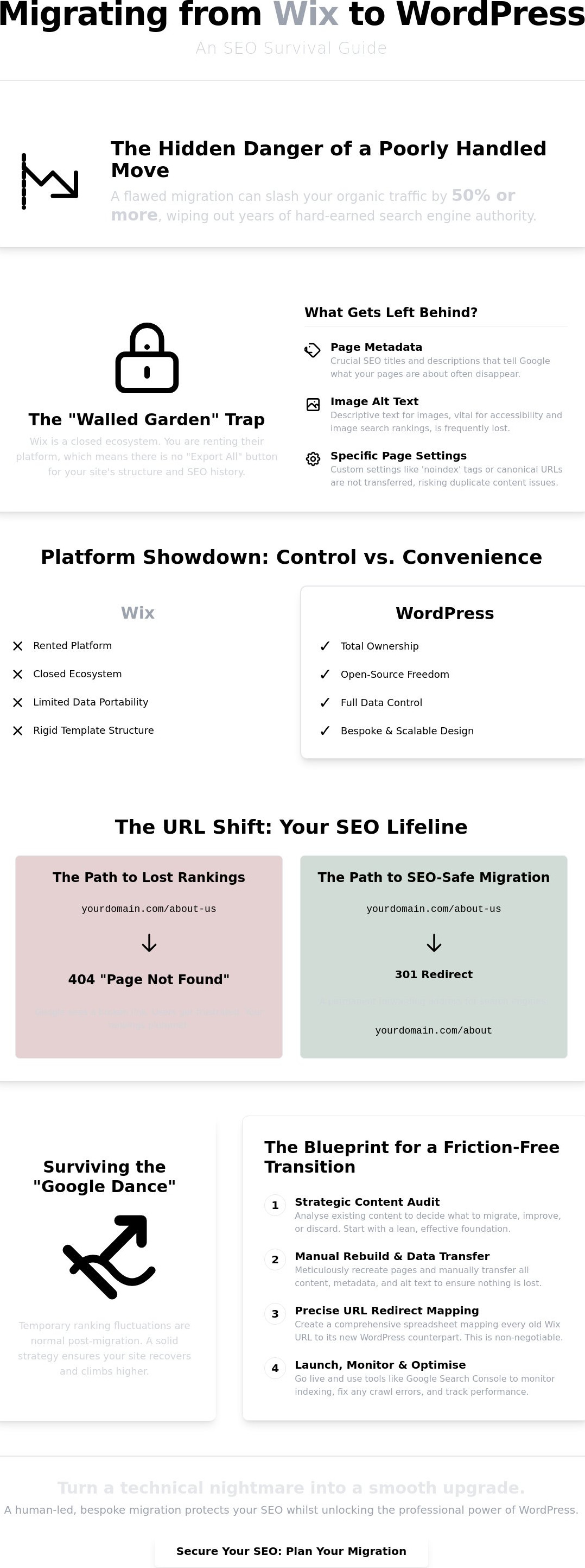
Imagine you’ve finally reached your breaking point with the “walled garden” that is Wix. You’re craving the professional freedom of WordPress, but that tiny voice in your head won’t stop whispering. What if your Google rankings simply vanish overnight? It’s a terrifying thought, especially when you realise that a poorly handled move can slash your organic traffic by 50% or more. Dealing with migrating from Wix to WordPress SEO issues feels a bit like performing a digital heart transplant; you want the upgraded performance (goodbye, rigid templates and monthly fees), but you definitely don’t want the patient to flatline during the process.
We completely understand that “stomach-drop” feeling. The technical “black box” of 301 redirects and messy URL structures is enough to make any sane business owner want to hide under their desk. However, moving to a more professional setup shouldn’t feel like a high-stakes gamble. This guide is here to pull back the curtain on the hidden pitfalls of leaving Wix so you can protect your hard-earned search visibility. We’ll walk through the manual rebuilding steps, the redirect essentials, and how to keep Google happy; ensuring you maintain your rankings whilst upgrading to a faster, more professional site.
Key Takeaways
- Understand why the Wix “walled garden” makes data portability tricky and how to manually salvage your hard-earned SEO history.
- Discover the essential steps for mapping redirects to fix migrating from Wix to WordPress SEO issues and keep those nasty 404 errors at bay.
- Uncover the hidden metadata and image alt text that often disappears during a transition, ensuring your “shop front” stays intact on Google.
- Prepare yourself for the “Google Dance” by understanding why temporary ranking shifts are normal and how to manage post-migration anxiety.
- Explore how a bespoke, human-led migration strategy turns a technical nightmare into a smooth upgrade for your brand’s digital presence.
Breaking Out of the Wix Walled Garden: Why Migration is Tricky
Think of your Wix website like a beautifully decorated flat in a gated community. It’s convenient, the gardens are tidy, and everything just works. But the moment you want to knock down a wall or move your bespoke furniture to a new house, you realise you don’t actually own the bricks and mortar. Wix is a closed ecosystem. You’re essentially renting their platform, which means you don’t have access to the underlying code or the database. When you start digging into the technical side, you’ll find that migrating from Wix to WordPress SEO issues often stem from this lack of direct access to your site’s “brain”. There is no magic “Export All” button that packages up your hard-earned digital authority and hands it over in a neat little box.
For many business owners in Sutton Coldfield, this creates a genuine sense of being “locked in”. You’ve spent years building your reputation, only to find that your digital assets are tethered to a platform that doesn’t want you to leave. Moving to WordPress isn’t just a copy-paste job; it’s a structural rebuild. Unlike the DIY nature of Wix, WordPress gives you total ownership, but getting there requires a precise, bespoke approach rather than a generic migration tool that might miss the fine details. Handling the complexities of migrating from Wix to WordPress SEO issues is the only way Gravitas Web Design ensures your rankings don’t plummet the moment you switch providers.
The Data Export Dilemma
Wix intentionally limits how much data you can take with you. Whilst you can often scrape blog content via an RSS feed, this usually only captures the bare-bones text. Your carefully crafted image metadata, specific page settings, and complex design elements are often left behind in the “walled garden”. Recreating these structures is a manual labour of love that is vital for Search engine optimization (SEO). If you rely on “automated” migration tools, you risk losing the technical nuances that tell Google your site is still the same trustworthy source it was before the move. It’s the difference between a professional transition and a messy digital breakup.
Transitioning from Template to Bespoke
Moving from a template-based Wix site to a custom WordPress build is a massive leap in professionalism. For our clients in Birmingham, Gravitas Web Design treats this as a “clean slate” philosophy. It’s the perfect moment to audit your existing content strategy. Why migrate a page that hasn’t seen a visitor in years? If you’re unsure whether you’ve already hit the tipping points that signal when to move from a template to a bespoke website, it’s worth understanding the signs before you begin. By treating this as a bespoke project rather than a simple data transfer, we can ensure your new site is leaner, faster, and far more effective. It’s about taking the best parts of your old site and giving them a professional home where they can actually grow without the “hoops” Wix makes you jump through.
The Great URL Shift: Avoiding Broken Links and 404 Errors
Let’s talk about the digital equivalent of a “lost in the post” nightmare. Imagine moving house but forgetting to tell the Royal Mail where you’ve gone. All your important letters, from bank statements to birthday cards, end up in a dusty pile on a doorstep you no longer own. This is exactly what happens when you don’t handle your URL structure correctly during a move. Wix and WordPress handle addresses differently. Wix often forces specific patterns, whilst WordPress gives you the keys to the city. This fundamental difference is at the heart of most migrating from Wix to WordPress SEO issues because Google hates a dead end.
When a user clicks an old link from a search result and lands on a 404 “Page Not Found” screen, it’s a disaster. Not only does the visitor bounce away in frustration, but Google also takes note. If it finds too many broken links, it assumes your site is poorly maintained and starts pushing you down the rankings. To prevent this, we use 301 redirects. Think of these as the internet’s version of a permanent forwarding address. They tell the search engine, “Hey, that page you like? It’s moved here now, and it’s even better.” It’s the secret to keeping your authority intact whilst you shift your digital centre of gravity.
Mapping Your SEO History
Before the first line of code is moved to your new bespoke WordPress site, you need a map. We create a comprehensive redirect spreadsheet that pairs every single Wix URL with its new WordPress counterpart to solve migrating from Wix to WordPress SEO issues before they even start. It sounds a bit like homework, but it’s non-negotiable. We prioritise your high-traffic pages to ensure there is zero downtime in visibility. Wix URLs often have strange quirks, like adding /post/ or /project/ into the middle of the string. WordPress doesn’t need that clutter. By mapping these out properly, we ensure the transition is invisible to your customers. If you’re feeling overwhelmed by the technical jargon, you can chat with us about a stress-free move.
Protecting Local SEO Value
If you’re a business serving specific areas like Lichfield or London, your local rankings are your bread and butter. You’ve likely spent months or years convincing Google that you’re the go-to expert in your town. A messy move can wipe that out. This is why following clear SEO guidance for small businesses is so important during a platform switch. You must ensure your location-specific pages keep their “link juice” and that your Name, Address, and Phone (NAP) data remains consistent across the web. Don’t forget to update your Google Business Profile as soon as the new site is live. Consistency is the key to keeping your local crown.
Metadata and Alt Text: The Hidden SEO Data Wix Keeps
Have you ever spent hours perfecting those little snippets of text that show up on Google? Those
Surviving the Google Dance: Managing Post-Migration Anxiety
Have you ever refreshed your search results every ten minutes, only to see your site jumping around like it’s had too much espresso? Welcome to the “Google Dance”. It’s that slightly stomach-churning period, usually lasting about a fortnight, where the search engine is trying to figure out your new digital layout. When you’re dealing with migrating from Wix to WordPress SEO issues, this fluctuation is entirely normal. Google isn’t punishing you; it’s just re-learning your new, improved structure. Think of it like a shop renovation. Even if the new storefront is stunning, the locals need a few days to figure out where you’ve moved the till.
Managing your expectations during this period is vital for your sanity. You might see a temporary dip, but don’t chuck your laptop out the window just yet. This is often followed by a permanent rise in rankings, especially if you’ve moved to premium hosting. A faster, more professional foundation gives Google every reason to prefer your new site over the old, clunky Wix version. We keep a close eye on this transition through Google Search Console and Bing Webmaster Tools, ensuring the “dance” leads to a standing ovation rather than a trip off the stage.
The First 48 Hours Post-Launch
The moment the site goes live, we trigger a fresh crawl by submitting your new XML sitemap. This is the digital equivalent of shouting “We’re open!” from the rooftops. We spend this time hunting for crawl errors that only show their faces once the site is live. It’s a busy window, but it’s where we catch the tiny technical gremlins before they become big problems. If you don’t see your site on page one instantly, breathe. Google needs time to process the change and verify your new redirects are solid.
Long-Term SEO Gains
Once the dust settles, the real fun begins. Because WordPress allows for much deeper speed optimisation, your site will naturally start to pull ahead of your old Wix template. You’re no longer restricted by a closed platform; you have the freedom to use advanced SEO plugins and bespoke coding that Wix simply can’t touch. Most Birmingham businesses we work with see a significant conversion increase after moving to a custom design, simply because the user experience is so much smoother and more professional. It’s about building a digital asset that you actually own.
Ready to stop worrying about your rankings and start growing your traffic? Book your migration consultation today and let’s get your move started.
The Gravitas Approach: A Friction-Free Transition
You didn’t start your business to become a part-time technical architect; you started it to do what you love. At Gravitas Web Design, we treat every move as a bespoke mission rather than a simple template swap. We know that the thought of migrating from Wix to WordPress SEO issues is enough to keep any business owner awake at night. That’s why we take the technical burden off your plate entirely. We’re the straight-talking partners who handle the “black box” of the move whilst you focus on running your empire. It’s about building a digital home you actually own, without the stress of doing the heavy lifting yourself.
A professional move is the perfect opportunity to sharpen your branding and ensure your message hits home with your target audience. By integrating professional copywriting from the start, we ensure your new site doesn’t just look better, it speaks better too. We make sure the transition is seamless, so your customers never feel the friction of a platform shift. Every element of your new site is designed to reflect your unique professional pride, ensuring your brand stays consistent from the first click to the final checkout.
Our Migration Checklist
Our process starts with a rigorous pre-migration audit to identify exactly what stays and what goes. We don’t just move clutter; we refine it. Before anything goes live, we build a “Shadow Site”, a private testing ground where we polish every detail until it’s perfect. Once we launch, our ongoing maintenance and hosting services keep your new site secure and fast. This hands-on approach is how we handle the complexities of migrating from Wix to WordPress SEO issues without the usual industry-standard awkwardness.
Ready to Leave Wix Behind?
There is a visible “Credibility Gap” between a basic Wix template and a bespoke London website. In a world where first impressions are made in milliseconds, staying on a limited platform can cost you more in lost opportunities than the move itself. If you’re still on the fence, check out our Wix vs custom web design UK: The Honest Comparison to see why growing businesses eventually make the leap. You might also find it useful to explore the exact business signals that indicate when to move from a template to a bespoke website so you can time your upgrade with confidence. Waiting usually costs more in the long run, so let’s start building a site you’re truly proud to show off.
Ready to Own Your Digital Future?
Leaving the Wix “walled garden” is a bold move, but it is the only way to truly own your digital assets. We’ve explored how a meticulous redirect map prevents 404 disasters and why rescuing your metadata is vital for keeping your “shop front” looking sharp on Google. Whilst the “Google Dance” might feel a bit nerve-wracking at first, it’s simply the final hurdle before you enjoy the speed and control of a bespoke WordPress build. Dealing with migrating from Wix to WordPress SEO issues is a precision task, but the long-term rewards for your brand are massive.
You don’t have to tackle this technical maze alone. We have been bespoke WordPress experts since 2019, specialising in technical SEO migrations that keep your traffic safe. With local UK support based in Sutton Coldfield, we offer a straight-talking partnership that puts your professional pride first. It’s time to trade the limitations of a template for a site that actually scales with your ambition.
Stop worrying about your rankings and let us handle your migration. Let’s build something you are genuinely excited to show off.
Frequently Asked Questions
Will I lose my Google rankings if I move from Wix to WordPress?
You won’t lose your rankings permanently if the migration is handled with precision. It is common to see a temporary “Google Dance” where your positions fluctuate for about a fortnight whilst the search engine crawls your new structure. By using proper redirects and keeping your content consistent, most businesses actually see a ranking boost because WordPress sites are typically faster and more technically sound than their Wix counterparts.
How long does a Wix to WordPress migration actually take?
A professional migration usually takes between two to four weeks depending on the complexity and size of your site. Because there is no “one-click” export tool, we have to manually recreate your page structures and map out every single redirect. This careful, bespoke approach ensures that we catch any migrating from Wix to WordPress SEO issues before they can impact your traffic or your brand’s reputation.
Can I keep the same URL structure when moving to WordPress?
You can often keep your main page URLs the same, but Wix frequently adds unnecessary prefixes like “/post/” or “/page/” that WordPress doesn’t require. We usually recommend cleaning these up to make your site look more professional. Even if the URL changes slightly, a 301 redirect ensures that both users and Google find the right place without any broken links or frustrating 404 errors.
What is a 301 redirect and why do I need one for my migration?
A 301 redirect is the digital version of a permanent forwarding address for your website. It tells search engines that a page has moved for good and points them to the new location on your WordPress site. Without these, Google would land on a “Page Not Found” screen; this causes your hard-earned authority to vanish and forces your visitors to bounce away to a competitor instead.
Is WordPress better for SEO than Wix for a UK service business?
WordPress is widely considered superior for UK service businesses because it offers total control over technical SEO aspects that Wix keeps locked away. You can fine-tune your site speed, implement advanced Schema markup for local areas, and use powerful plugins to manage your metadata. This extra control often leads to better visibility in competitive local markets where every millisecond of loading time counts toward your ranking.
Will my images and blog posts move over automatically?
No, your content does not move over automatically because Wix is a closed platform. Whilst we can scrape some blog text via RSS feeds, images and metadata usually need to be migrated manually to ensure they aren’t still “hotlinking” to Wix servers. This manual process is actually a blessing in disguise; it is the perfect time to rename files for better SEO and audit your content strategy.
What happens to my local SEO rankings in Birmingham during the move?
Your local SEO rankings in Birmingham should remain stable as long as your Name, Address, and Phone data stays consistent. We pay special attention to location-specific landing pages and ensure your Google Business Profile is updated to point to the new WordPress URLs. By handling migrating from Wix to WordPress SEO issues at a local level, we protect your reputation in the Midlands whilst upgrading your digital storefront.
Do I need to hire an SEO expert for a website migration?
Hiring an expert is highly recommended if your website generates leads or revenue. A “DIY” migration often leads to broken links, lost metadata, and a massive drop in organic traffic that can take months to recover. Having a specialist manage the technical “black box” of redirects and server settings gives you peace of mind and ensures your business doesn’t go invisible during the transition.