
Web Design Blog
Squarespace to WordPress Migration SEO: Scaling Your Business Without Losing Your Rankings
Imagine hitting “publish” on your shiny new WordPress site, only to wake up the next morning and find your Google rankings have vanished. It’s the kind of digital horror story that keeps business owners awake at 2 am, clutching their tablets in a cold sweat. You know you’ve outgrown the “one size fits all” world of Squarespace, and you’re craving the freedom of a bespoke build. However, the anxiety surrounding Squarespace to WordPress migration SEO is a massive hurdle. Is it actually possible to move without breaking every link and losing your traffic?
We get it. You’re frustrated by those rigid templates and confused by the mountain of conflicting technical advice found online. The good news is that moving house doesn’t have to be a gamble. In fact, when handled with a bit of strategy and a lot of care, it’s the best way to scale your business and finally look like the industry leader you are. We’re going to show you exactly how to protect your search rankings whilst transitioning to a site that feels professional, credible, and entirely yours. We’ll cover everything from mapping your redirects to ensuring your content lands safely in its new, high-performance home.
Key Takeaways
- Learn why hitting the “Squarespace ceiling” is actually a sign of success and how WordPress provides the bespoke architecture your growing business needs.
- Master the art of Squarespace to WordPress migration SEO by prioritising your URL structure and mapping out “forwarding addresses” for Google.
- Discover how moving to premium WordPress hosting can give you a hidden advantage in Core Web Vitals and overall site performance.
- Follow a step-by-step pre-migration audit to ensure every hard-earned keyword and page you currently own makes the journey safely.
- Understand why a strategic migration is about more than just moving files; it’s an opportunity for a complete branding evolution that builds credibility.
The Squarespace to WordPress Migration: Why Growing Firms Make the Leap
You’ve probably felt it. That subtle, nagging sense that your website is finally starting to hold you back. We call it the “Squarespace Ceiling”. It’s that moment when your business outgrows the “drag and drop” simplicity of a template builder and starts needing something with real weight behind it. For professional UK service businesses, WordPress isn’t just another platform; it’s the gold standard for serious growth. Making the leap represents a massive psychological shift. You’re moving from simply “having a website” to truly owning a high performance digital asset that works as hard as you do.
It’s perfectly normal to feel a bit sick at the thought of a move. You’ve spent months, maybe years, building your search visibility. The fear of a Squarespace to WordPress migration SEO disaster is a common anxiety, but it shouldn’t be the thing that stops you from scaling. Think of it like moving from a rented flat to a house you’ve actually designed from the foundations up. Yes, the packing is a bit of a faff, and the logistics are complex. However, the long term payoff of a site that doesn’t limit your potential is worth every bit of the effort. We’re here to make sure that “moving day” is a celebration, not a crisis.
Breaking Free from Template Rigidity
Templates are brilliant for getting started, but they eventually become a straightjacket. When you’re stuck in a pre-defined box, your user behaviour is dictated by what the template allows, not what your clients actually need. A bespoke WordPress build lets you organise your site structure without any platform-imposed limits. You can design conversion paths that feel natural and intuitive for your specific audience. Moving away from the “all in one” trap means you’re no longer settling for “good enough” features. Instead, you’re creating a tailored digital ecosystem where every single pixel serves your unique business goals.
The SEO Potential of a Bespoke WordPress Build
Generic sitemaps and rigid, automated metadata fields will only take your brand so far. With a bespoke build, you get custom code that’s lean, fast, and built for Search engine optimization (SEO) from the very first line of code. You also gain full, unmitigated control over your hosting environment and your data. This level of ownership is vital for long term security and consistent performance. If you’re still weighing up the pros and cons, our guide on when to move from a template to a bespoke website offers deeper context on the scaling journey. Professional optimisation isn’t just about checkboxes; it’s about building a foundation that Google actually respects.
The Technical Truth: How Migration Impacts Your Google Rankings
Think of Google as a very busy postman who has had one too many espressos. When you move house, if you don’t set up a proper forwarding address, your mail ends up in a dead letter office. In the digital world, this “forwarding address” is the invisible handshake between your old Squarespace pages and your new WordPress home. A successful Squarespace to WordPress migration SEO strategy hinges on making this handshake as firm and clear as possible. If Google arrives at your old URL and finds a “Closed” sign with no directions to the new shop, it simply stops visiting.
URL structure is the single most important anchor of your search authority. It’s the primary way Google indexes your history and trust. If your URL changes from /services to /bespoke-services without a specific technical instruction, Google treats it as a brand new page with zero reputation. You lose all the “link juice” you’ve spent years brewing. When you dig into a strategic comparison for professional SEO, it becomes clear that while Squarespace is convenient, WordPress offers the granular control needed to keep these digital anchors exactly where they belong.
Permalinks and the Danger of 404 Errors
Squarespace has its own rigid way of organising links, often adding dates or platform-specific categories into the URL slug by default. WordPress is far more flexible, but that freedom can be a trap if you aren’t careful. If these patterns clash during the move, you end up with “zombie pages”. These are pieces of content that technically exist but are invisible to search engines. Broken links don’t just annoy Google; they damage your online credibility in places like Sutton Coldfield and London, where a professional reputation is everything. Every 404 error is a missed opportunity and a potential client bouncing to a competitor.
Schema and Technical Metadata
Metadata is the DNA of your search presence. When moving, you need to ensure your favourite keywords are tucked safely into the new site’s code. Schema Markup is the digital translator for search engines. By implementing bespoke schema for local service firms, you help Google understand exactly what you do and who you serve. This keeps your Google Business Profile perfectly synced, ensuring you don’t disappear from local maps whilst the transition is happening. It’s about being proactive rather than reactive.
Let’s be transparent: a small “migration dip” in traffic is perfectly normal. Google needs a moment to re-crawl and verify that you’ve actually moved to a better neighbourhood. However, a professional Squarespace to WordPress migration SEO plan ensures this dip is a minor blip rather than a nosedive. If the technical jargon is starting to feel like a headache, you might want to reach out for a chat about how we can handle the heavy lifting for you.
Squarespace vs WordPress: A Strategic Comparison for Professional SEO
Squarespace is like a beautifully decorated hotel room. It’s clean, it’s easy, and someone else handles the plumbing. But if you want to knock down a wall or install a private cinema, you’re out of luck. WordPress, on the other hand, is a house you own from the foundations up. When it comes to Squarespace to WordPress migration SEO, the choice is between a platform that gives you “enough” and one that gives you everything. For a growing Birmingham business, “enough” usually stops being sufficient the moment you try to outrank a serious competitor who has invested in a bespoke build.
The convenience of Squarespace often masks a lack of deep technical control. You’re limited by platform-wide scripts and server settings you can’t touch. On WordPress, you can choose premium hosting that is specifically tuned for speed. This isn’t just about shaving a millisecond off your load time; it’s about acing Google’s Core Web Vitals. Clean, bespoke code means your site doesn’t just look professional; it performs with a level of agility that template-based builders simply cannot match. To ensure your transition is handled with precision, following a comprehensive SEO Migration Checklist is essential for keeping your hard-earned rankings intact.
The Plugin Powerhouse vs Built-in Basics
While Squarespace claims to have “everything you need,” professional SEOs know that “everything” is a relative term. Tools like Yoast or RankMath provide a level of granular insight that built-in basics can’t touch. You gain the power to customise every single meta tag, alt text, and social share image with surgical precision. This level of detail is vital for:
- Managing local SEO for multiple locations across the West Midlands and beyond.
- Creating advanced schema markups that help you stand out in search results.
- Optimising social share images to maintain brand consistency on every platform.
A bespoke WordPress platform makes organising this data far simpler than fighting with a rigid template. It allows your digital presence to grow whilst your competitors stay static.
Mobile Performance and User Experience
For London property firms or high-end service providers, a flawless mobile experience is non-negotiable. Most of your clients are browsing on the move, and if your site feels clunky or slow, they’re gone. Bespoke design allows for better keyword integration and copy placement without breaking your layout. It ensures that your content depth doesn’t sacrifice speed. This clean code approach has a direct impact on your mobile search rankings. If you want to dive deeper into why this matters for your specific industry, check out our guide on SEO for service businesses. It’s about moving from being a “best-kept secret” to a visible market leader.
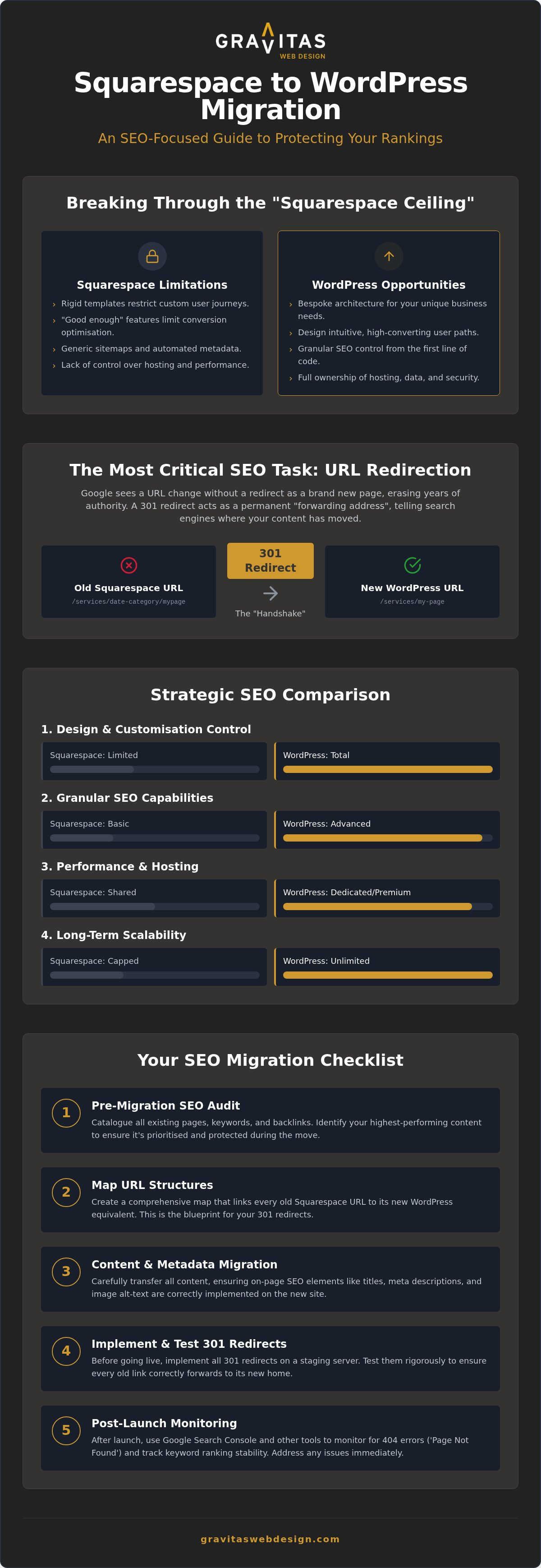
The SEO Migration Checklist: Protecting Your Visibility Step-by-Step
Some guides will tell you that moving platforms is as simple as clicking an “import” button and making a cup of tea. If only it were that easy. A truly successful Squarespace to WordPress migration SEO project requires a phased approach that treats your data with the respect it deserves. We break this down into four distinct stages: the pre-migration audit, the redirect mapping, the content optimisation, and the post-launch technical verification. By following this structure, you ensure that no hard-earned traffic is left behind in the transition and your site is ready for immediate growth.
Mapping Your 301 Redirects
Before you even think about turning off your old site, you need a comprehensive spreadsheet of every single URL Squarespace has ever generated for you. This is your master list. You’ll then match these old addresses to your new, bespoke WordPress URLs. This ensures that any link equity you’ve built up over the years follows you to your new home. A 301 redirect is a permanent instruction to search engines. It tells Google that the content hasn’t just vanished; it has simply moved to a much nicer, more professional location. Without this map, you’re essentially inviting your customers to a grand opening at an address they don’t have.
Content Auditing and Copywriting
Migration is the perfect excuse for a bit of digital spring cleaning. It’s the ideal time to refresh your brand voice and ensure your messaging actually sounds like you, rather than a corporate robot. Whilst you’re moving things over, we ensure your target keywords are naturally woven into the new, professional layouts. This isn’t just about search rankings; it’s about making sure those visitors actually turn into clients once they land. For more on this, take a look at our guide on how to get more enquiries from my website.
Post-Launch Monitoring
Once the new site is live, the work isn’t quite finished. You need to keep a very close eye on Google Search Console for at least the first 30 days. We look for crawl errors, indexing issues, or any “zombie pages” that might have slipped through the cracks. When managing a Squarespace to WordPress migration SEO, this technical verification is what separates a professional move from a DIY disaster. Ongoing WordPress maintenance is essential here to keep your SEO healthy and your reputation protected. It’s about being proactive, not waiting for things to break.
Ready to make the move without the drama? Let’s get started on your migration plan today.
Beyond the Technical: Why a Bespoke Partner Makes Migration Painless
Let’s be honest for a second. You didn’t start your business because you had a burning passion for managing 301 redirects or auditing sitemaps on a Saturday morning. There is a massive difference between a purely technical move and a strategic branding evolution. A technical move is just shifting boxes from one flat to another; a strategic evolution is about finally moving into the headquarters your business deserves. When you partner with experts who understand Squarespace to WordPress migration SEO, you aren’t just fixing a platform issue. You’re turning your website from a passive digital brochure into your most energetic, 24/7 salesperson.
Local expertise in Birmingham and London gives you a distinct competitive edge that a generic online tutorial simply cannot provide. We understand the specific expectations of professional firms in these hubs. They don’t want “good enough” templates; they want credibility. By adopting a policy of radical transparency, we aim to remove that cringeworthy “industry-standard awkwardness” often found in web design. We don’t hide behind layers of bureaucracy or confusing jargon. We just focus on results that make you feel proud to share your URL again.
The Gravitas Approach to Migration
Our goal is to handle all the heavy lifting whilst you focus on what you actually do best. We believe in a “human-to-human” connection that prioritises your peace of mind over technical box-ticking. This means jargon-free communication and a straightforward process from start to finish. We ensure that your bespoke logo and branding don’t just “fit” onto the new site; they shine on a high-performance platform built specifically for them. It is about creating a digital environment where your brand identity feels at home, not squeezed into a pre-set box that thousands of other businesses are using.
Your Next Steps to Digital Credibility
The transition to WordPress is also an opportunity to upgrade your foundation. Secure, high-performance hosting in the UK is not just a “nice to have”; it is a vital component of your long-term search performance and security. Throughout the creative process, we act as your friendly guide, ensuring you never feel lost in the technical weeds. Stop settling for the limitations of “good enough” templates. It is time to invest in a bespoke digital asset that reflects the true scale of your ambition. If you are ready to stop worrying about your rankings and start focusing on your growth, let’s make this migration the easiest decision you have made all year.
Ready to Claim Your Digital Independence?
Scaling your business should feel like a massive achievement, not a technical nightmare that keeps you awake at night. We have explored how moving away from the “one size fits all” template world is the only way to truly own your digital presence and break through that platform ceiling. By focusing on a meticulous redirect strategy and lean, custom code, you can protect your hard-earned rankings whilst building a site that actually looks the part. A successful Squarespace to WordPress migration SEO project isn’t just about shifting files; it’s about evolving your brand into a high-performance asset that works as hard as you do.
You don’t have to navigate these technical weeds alone. As Sutton Coldfield based experts, we act as your professional ally, providing end-to-end SEO and branding without the industry-standard jargon. We are here to handle the heavy lifting so you can get back to what you love, confident that your digital reputation is in safe hands. It’s time to stop settling for “good enough” and start building something bespoke that you are genuinely proud to share with the world.
Ready to move beyond templates? Let’s discuss your bespoke WordPress migration.
Frequently Asked Questions
Will I lose my Google rankings if I move from Squarespace to WordPress?
You won’t lose your rankings if the move is handled with a proper technical strategy. Whilst a minor, temporary “blip” is normal as Google re-crawls your new home, a professional Squarespace to WordPress migration SEO plan prevents a permanent nosedive. The secret lies in those 301 redirects we mentioned earlier. By telling search engines exactly where your content has moved, you preserve your hard-earned authority and set the stage for even better visibility.
How long does a Squarespace to WordPress SEO migration typically take?
A bespoke migration usually takes between four to eight weeks from the initial audit to the final launch. This isn’t just about moving files; it’s about crafting a custom design, mapping out every single URL, and refining your copy. We don’t believe in rushing a job that impacts your livelihood. Taking the time to get the foundations right ensures your new site is stable, secure, and ready to perform from day one.
Do 301 redirects really pass all of my SEO authority to the new site?
They pass the vast majority of your authority, essentially acting as a permanent “forwarding address” for search engines. Whilst no redirect is 100% perfect, a well-executed 301 redirect ensures Google understands your content’s new location without losing the trust you’ve built over the years. It is the single most important technical step in protecting your link equity. Without them, you’re basically starting from zero, which is a gamble no growing firm should take.
Can I move my Squarespace blog posts to WordPress without losing comments?
Yes, you can certainly bring your blog comments along for the ride. Most professional migration tools allow for the export of comment data alongside your posts. However, it often requires a bit of manual “tidying up” to ensure the formatting looks right in your new bespoke layout. We prioritise keeping your community engagement intact because those conversations add significant value and social proof to your brand’s digital presence.
Is WordPress actually harder to use than Squarespace for a small business?
It is different, rather than harder. Whilst Squarespace is a closed shop, WordPress offers a bespoke environment that we tailor to your specific needs. Once we’ve set up your custom dashboard, you’ll find it incredibly straightforward to update text or add new blog posts. You aren’t fighting a rigid template anymore; you’re using a tool designed for your business. Most clients find the freedom and scalability far more rewarding than the platform-imposed limits.
What happens to my images and galleries during the migration process?
Your images are carefully transferred and re-optimised for your new site. We don’t just “copy and paste” them; we ensure they are properly sized and tagged with the correct alt text for better accessibility and search visibility. Squarespace galleries are rebuilt into faster, more flexible WordPress layouts that look stunning on mobile. It’s an opportunity to ensure your visual content loads quickly and contributes positively to your overall Core Web Vitals.
Do I need to change my domain name when moving from Squarespace?
No, you absolutely keep your existing domain name. In fact, keeping your domain is vital for maintaining your SEO authority. We simply point your domain away from Squarespace’s servers and towards your new, high-performance WordPress hosting. It’s like keeping your phone number when you switch networks. Your clients won’t notice any change to your web address, but they will certainly notice the improved speed and professional feel of the site.
How much does a professional Squarespace to WordPress migration cost in the UK?
The cost varies significantly depending on the complexity of your site and the amount of content being moved. A bespoke project that includes custom design, strategic SEO mapping, and professional copywriting is an investment in your business’s future. Whilst we don’t provide flat-rate pricing without seeing your current setup, a high-performance Squarespace to WordPress migration SEO project focuses on delivering an asset that pays for itself through better conversions and visibility.