
Web Design Blog
How Much Does it Cost to Fix a Hacked Website? The No-Nonsense Guide
Imagine pouring your first coffee, opening your laptop, and seeing a garish red warning screen where your beautiful homepage used to be. It’s a proper gut-punch. Beyond the immediate panic, there’s that nagging anxiety about what the actual cost to fix a hacked website will be whilst your customers lose faith in your brand. You just want that “This site may be hacked” label gone without being bamboozled by technical jargon like “backdoors” or being overcharged in the middle of a crisis. We understand that feeling of vulnerability; it’s like someone has broken into your favourite shop and moved all the furniture around whilst you were sleeping.
In this guide, we’re going to pull back the curtain on the real hard and soft costs of repairing a compromised site so you aren’t left guessing. You’ll discover everything from immediate malware removal fees to the long-term impact on your hard-earned reputation. We’ll also look at why the “cheapest” repair often ends up being the most expensive mistake you could make. By the end, you’ll have a clear, predictable path back to a clean, secure website that you can feel proud of once again.
Key Takeaways
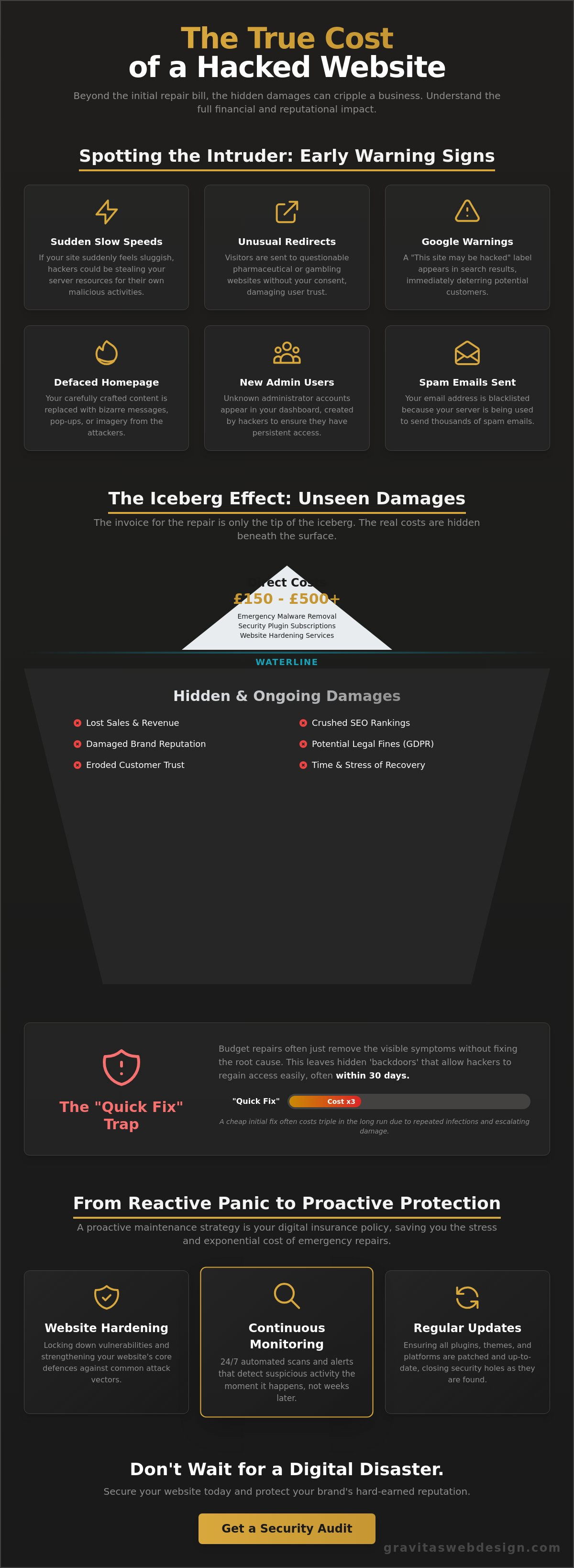
- Learn to spot the sneaky “tells” of a compromise, like weird redirects or slow speeds, before Google slaps a warning label on your search results.
- Uncover the real cost to fix a hacked website by weighing up immediate repair fees against the “soft” damage to your customer trust and revenue.
- Discover why budget-friendly “quick fixes” often fail, leaving backdoors wide open for hackers to strike again within just 30 days.
- Find out how switching to a proactive maintenance strategy acts as a digital insurance policy, saving you from the stress and expense of future emergency repairs.
The Heart-Sink Moment: Identifying the Hack Before the Bill Arrives
You know that cold, prickly feeling when something is just… off? You type your URL, expecting your beautifully organised homepage, but instead, you’re met with a garish red warning or a bizarre redirect to a site selling questionable pharmaceuticals. It’s a proper heart-sink moment. Your digital shopfront has been defaced, and the immediate panic is usually followed by a mental calculation of how much this is going to hurt your wallet. Take a breath. Whilst it feels like a personal attack, it’s often just an automated bot that found an unlocked window in your code.
Hacks generally fall into two categories: the “noisy” and the “quiet”. A noisy hack is a cry for attention; think defaced pages or bizarre pop-ups. It’s jarring, but at least you know it’s happened. A “quiet” hack is far sneakier. These involve scripts that sit silently in your files, harvesting customer information or using your server to send thousands of spam emails. If you look at the list of security hacking incidents on Wikipedia, you’ll see that even global giants struggle with these invisible intruders. For a small business, the “quiet” hack is often more damaging because it can go unnoticed for months, quietly eroding your reputation whilst you’re none the wiser.
Signs your website has been compromised
Sometimes the signs are subtle. You might notice a sudden, unexplained drop in your SEO rankings whilst your competitors suddenly leapfrog you for your favourite keywords. Google is incredibly protective of its users; if it detects malware, it will demote your site or slap a “This site may be hacked” warning on your search listing. You might also get a frantic email from a loyal customer reporting strange behaviour or, worse, that they’ve received a “dodgy” email from your official address. If your site suddenly feels like it’s wading through treacle, that sluggish speed could be a sign that a hacker is using your server resources for their own gain.
The “Immediate Response” checklist
When you realise you’re a victim, your first instinct might be to start deleting files or entire folders. Don’t. You might accidentally delete the very evidence needed to find the entry point, or worse, break the site further. Instead, follow this quick list:
- Take screenshots: Document everything. If sensitive data was involved, you might need these for insurance claims or police reports.
- Change your passwords: Not just your WordPress login. Change your hosting control panel, SFTP, and database passwords immediately. This is your first line of defence.
- Check your users: Look for any new “administrator” accounts you don’t recognise. Hackers love to create a back-up entrance for themselves.
Ignoring the problem and hoping it goes away is the most expensive strategy you can choose. Malware doesn’t just disappear; it spreads. The longer you wait, the more the cost to fix a hacked website climbs as the infection weaves itself deeper into your database. It’s much like a leak in your roof. You can put a bucket under it today for a few quid, or you can wait until the whole ceiling collapses and costs you thousands.
Breaking Down the Invoice: Hard Costs vs Hidden Damages
When you finally get an expert on the phone, your first question is usually a blunt one: “How much?” It’s a fair question. You’re in a crisis, and you need a number. But here is the kicker; the total cost to fix a hacked website is rarely just the figure on the final invoice. We like to think of it as the “iceberg effect”. The direct repair fee is the bit you see poking out of the water, whilst the massive, ship-sinking bulk of the damage is lurking beneath the surface in the form of lost sales and a battered reputation.
Experts often highlight The Hidden Costs Of Cybersecurity, which points out that the financial sting goes far beyond the initial cleanup. For most UK business owners, the repair bill is just the tip of the iceberg. You also have to factor in the “opportunity cost” of your site being offline. Every hour that red Google warning remains is an hour your customers are clicking away to your competitors instead.
Direct expenses: Repair fees and security tools
Let’s talk cold, hard cash. Typical UK industry rates for emergency malware removal usually sit between £150 and £500. This range depends on how deeply the infection has burrowed into your database. You might also find yourself paying for premium “clean-up” subscriptions or security scanners to ensure the intruders don’t just walk back in through the same hole. Don’t forget your hosting provider, either. Some hosts will suspend your account if it’s spreading malware, and they might charge “reinstatement” fees once you’ve proven the site is clean again. It’s an expensive, frustrating loop to be stuck in.
The soft costs: Reputation and SEO devastation
The “soft” costs are often the ones that keep you awake at night. If customers suspect their data was compromised, re-earning that trust is a long, expensive road. Then there is the SEO damage. Google hates serving up infected sites to its users. Once you’re blacklisted, regaining those lost positions can take months of careful work. For UK firms, the legal side is even heavier. Under GDPR, the maximum fine for severe violations is the greater of €20 million or 4% of your global annual revenue. Even for a small breach, the paperwork and potential fines from the ICO are enough to make any business owner wince. If you’re tired of playing digital whack-a-mole with your security, it might be time to chat with a professional about a more permanent solution.
Choosing Your Weapon: Comparing Repair Options and Price Brackets
Once the initial shock has worn off, you’re left standing at a digital crossroads. Who do you trust to scrub away the malware and restore your site to its former glory? It’s tempting to look for the quickest, cheapest exit, but the cost to fix a hacked website depends heavily on whether you’re looking for a temporary patch or a permanent fortress. Your choice of “weapon” in this fight will determine not just the immediate bill, but how likely you are to be dealing with the same headache again next Tuesday.
The DIY route is often the first port of call for the budget-conscious business owner. There are plenty of free plugins out there that promise a one-click miracle. However, hackers are clever; they often hide “backdoors” in obscure folders that these basic scanners simply miss. If you don’t have a deep understanding of file structures, you might end up playing a frustrating game of digital whack-a-mole. Then there is the freelancer option. Whilst often cost-effective, a generalist developer might lack the deep security expertise required to “harden” a site against sophisticated attacks. They might get you back online, but will they stop the next intruder?
For those who can’t afford a second round of downtime, specialist security agencies are the high-assurance choice. They provide a thorough “clean and harden” service that looks at the entire environment, from your hosting setup to your database. We often find that having local expertise in places like Birmingham or London makes a world of difference. There is a level of accountability and clear communication you get from a UK-based partner that you simply won’t find with a faceless, automated service based halfway across the world.
Automated tools vs manual deep-cleans
It is a common mistake to think a security plugin is a silver bullet. Automated tools are a bandage, not a cure. Whilst they are great for spotting common signatures, they often miss malicious code that has been cleverly injected into your database or disguised as a legitimate system file. A manual audit by a human who understands WordPress architecture is the only way to ensure every trace of the infection is gone. It’s the difference between a quick car wash and a full engine strip-down.
The “No Fix, No Fee” trap
Be wary of anyone offering a “No Fix, No Fee” guarantee without defining what “fixed” actually means. Does it mean your site is just back online, or is it actually secured against future attacks? Before you hand over your credit card, ask the developer if they are going to identify the original entry point. If they just remove the symptoms without patching the hole, you’re essentially leaving your front door wide open after a burglary. Ensure the repair includes a full security audit to stop the cycle of re-infection.
Why a “Quick Fix” Often Costs Triple in the Long Run
Imagine paying for a professional to clean your house after a break-in, only for them to leave the front door wide open as they walk out. It sounds ridiculous, doesn’t it? Yet, this is exactly what happens when you opt for a surface-level “clean-up” without addressing the root cause. Industry professionals often find that a staggering 60% of hacked sites are hit again within just 30 days because the original entry point was never closed. This is why the initial cost to fix a hacked website can quickly triple. You’re paying for the same job multiple times whilst your reputation continues to take a battering.
The difference lies in “patching” versus “hardening”. Patching is just fixing the hole. Hardening is reinforcing the entire building. If you’re running outdated plugins or “abandoned” themes that haven’t seen an update in years, you’re essentially leaving a key under the mat for any passing bot. These old bits of code are like rusty locks; they might still work, but they won’t stop anyone who actually wants to get in. Don’t let a cheap fix become a recurring nightmare.
The anatomy of a proper repair
A thorough repair isn’t just about deleting a few “bad” files and hoping for the best. It’s a methodical process that ensures your site stays clean. Here is how it should look:
- Step 1: Complete malware removal. This involves scrubbing every single file and database entry to ensure no malicious scripts are left behind.
- Step 2: Identifying and patching the entry point. Finding the “how” is vital. Was it a weak password, a vulnerable plugin, or a server-level exploit?
- Step 3: Hardening the site. This is where we turn your site into a fortress by adding robust firewall rules, login protection, and security headers.
Why cheap hosting is a false economy
Your hosting environment is often the silent culprit in security breaches. If you’re on a budget server, you’re likely sharing space with thousands of other websites. If one of those “neighbour” sites is compromised, the infection can hop across to your site like a digital flu. This is where premium wordpress hosting UK becomes an investment rather than a cost. High-quality servers isolate your site, provide active monitoring, and include daily, off-site backups. If the worst does happen, a clean backup can be restored in minutes, slashing your downtime costs to almost zero. If you’re ready to stop the cycle of emergency repairs, let’s talk about securing your site properly.
Beyond the Repair: How to Stop the Cycle of Digital Break-ins
Once the dust has settled and your site is finally back to its shiny, functional self, you’re faced with a choice. You can go back to crossing your fingers every morning, hoping the red warning screen doesn’t return, or you can decide that this was the last time you’ll ever deal with a digital break-in. Moving from a reactive “fix it when it breaks” mindset to a proactive one is the smartest financial move you can make for your business. Think of website security maintenance not as another monthly bill, but as a proper insurance policy for your brand. It’s about bolting the doors before the intruder arrives, rather than calling the locksmith whilst your shop is being emptied.
There is a certain peace of mind that comes from knowing experts are watching your back. When you aren’t constantly worried about the next “heart-sink” moment, you can actually focus on running your business. Your website is, after all, your most valuable employee. It works 24/7, never takes a sick day, and is often the first point of contact for your future customers. Treating its health as an afterthought is a risky game that usually ends in an expensive emergency. By investing in its long-term care, you ensure this “employee” remains a reliable asset rather than a liability waiting to happen.
The ROI of professional maintenance
When you sit down and look at the total cost to fix a hacked website, the maths is simple. A single emergency repair, coupled with days of lost leads and the stress of a tarnished reputation, far outweighs the annual cost of a steady maintenance plan. Professional WordPress maintenance services Lichfield ensure your software is updated whilst you sleep, closing vulnerabilities before they can be exploited. As a lovely bonus, regular care also keeps your site running at peak performance, which keeps both your customers and Google very happy indeed.
Your next steps to a secure future
If you’re still using a generic, bloated template from a marketplace, you might be carrying more risk than you realise. These “one-size-fits-all” themes often come with heaps of unnecessary code that hackers love to hide in. Shifting towards bespoke web design often results in a leaner, more secure site that’s much harder to crack. Before the next disaster strikes, consider performing a comprehensive security audit to find the weak spots you didn’t know existed. It’s time to stop playing digital whack-a-mole. If you’re ready to stop the cycle of panic and finally get some peace of mind, Chat to Gravitas about securing your site for good.
Reclaiming Your Peace of Mind and Your Digital Shopfront
Facing a hack is a proper gut-punch, but it doesn’t have to be the end of your business story. We’ve seen how the true cost to fix a hacked website goes far beyond the initial cleanup bill; it can swallow up your hard-earned SEO rankings and customer trust if left to fester. You now know that a “quick fix” is often just a temporary bandage on a deeper wound, and the only real way to sleep soundly is to move from panic-led repairs to a proactive, hardened security strategy.
Since 2019, Gravitas has been providing founder-led, transparent UK support for business owners who are tired of technical jargon and hidden fees. We specialise in bespoke, secure WordPress development designed to keep the intruders out for good. Your website should be a source of professional pride, not a source of constant anxiety. Let’s get your digital shopfront back in order so you can focus on growing your business instead of fighting off bots.
Ready to stop the cycle of digital break-ins for good? Get a straight-talking quote to fix or protect your site.
It’s time to take back control and ensure your website remains the hardworking, reliable asset your business deserves.
Frequently Asked Questions
Is it worth paying to fix a hacked website or should I just start again?
It’s almost always better to fix a site that has established SEO value and a history with your customers. Starting from scratch means losing your domain authority, backlink profile, and years of content, which costs far more in the long run than a professional cleanup. Unless your site was already outdated and due for a complete redesign, a specialist repair is the most sensible and cost-effective path forward.
Will my insurance cover the cost to fix a hacked website?
Whether insurance covers the cost to fix a hacked website depends entirely on the specifics of your policy. Standard business insurance rarely includes digital incidents, so you’ll need to check if you have a “Cyber Liability” or “Data Breach” add-on. Some modern policies cover repair fees, legal costs, and even lost revenue, so it’s worth a quick, straight-talking chat with your broker to see where you stand.
How long does it typically take to clean and restore a hacked WordPress site?
A professional clean and restoration typically takes between 24 and 48 hours, depending on how deeply the infection has burrowed. Whilst a surface clean can be done quickly, a deep database audit and “hardening” process takes a bit longer to ensure the intruders don’t just walk back in. DIY attempts often drag on for weeks because the root cause is rarely identified, leading to a frustrating cycle of re-infection.
Can I fix a hacked website myself for free using plugins?
You can try to use free security plugins, but they are rarely a complete solution for a sophisticated attack. These tools are excellent for spotting common malware signatures, but they often miss bespoke backdoors or malicious code buried deep in your database. Using a plugin alone is like hoovering a carpet when you’ve actually got a termite infestation; the surface looks better, but the structural problem remains untouched.
Why did my website get hacked if I have an SSL certificate?
An SSL certificate (the little padlock) only encrypts the data travelling between your visitor and the server; it doesn’t protect the site itself from being compromised. Think of it like a secure armoured van delivering a parcel to a house with an unlocked front door. The transport was safe, but the house was still vulnerable to weak passwords, outdated plugins, or server-level exploits.
Will Google penalise my rankings forever after a hack?
No, Google won’t penalise you forever, but you need to move fast to limit the damage. Once the site is clean and you’ve requested a review through Google Search Console, the “This site may be hacked” warning usually disappears within 72 hours. Your rankings should eventually return to normal, provided the site wasn’t left in a compromised state for so long that Google completely lost trust in your domain.
What happens if I don’t fix my hacked website immediately?
If you don’t fix the issue immediately, the situation will spiral from a technical glitch into a business-ending crisis. Your hosting provider will likely suspend your account to protect other users on their network, and Google will eventually de-index your site entirely. Most importantly, you risk significant GDPR fines if customer data is accessed, which can reach up to 4% of your global annual revenue.
Does my hosting company have to fix my site if it gets hacked?
Most hosting companies aren’t responsible for fixing your site’s internal code or removing malware. They provide the “plot of land,” but you are responsible for the “house” you build on it. Whilst some premium hosts might offer basic cleanup tools or restore a backup, they’ll usually just suspend your account and tell you to hire a professional developer to resolve the mess.