
Web Design Blog
Website Security Maintenance: The Essential Digital Hygiene Checklist for Business Owners
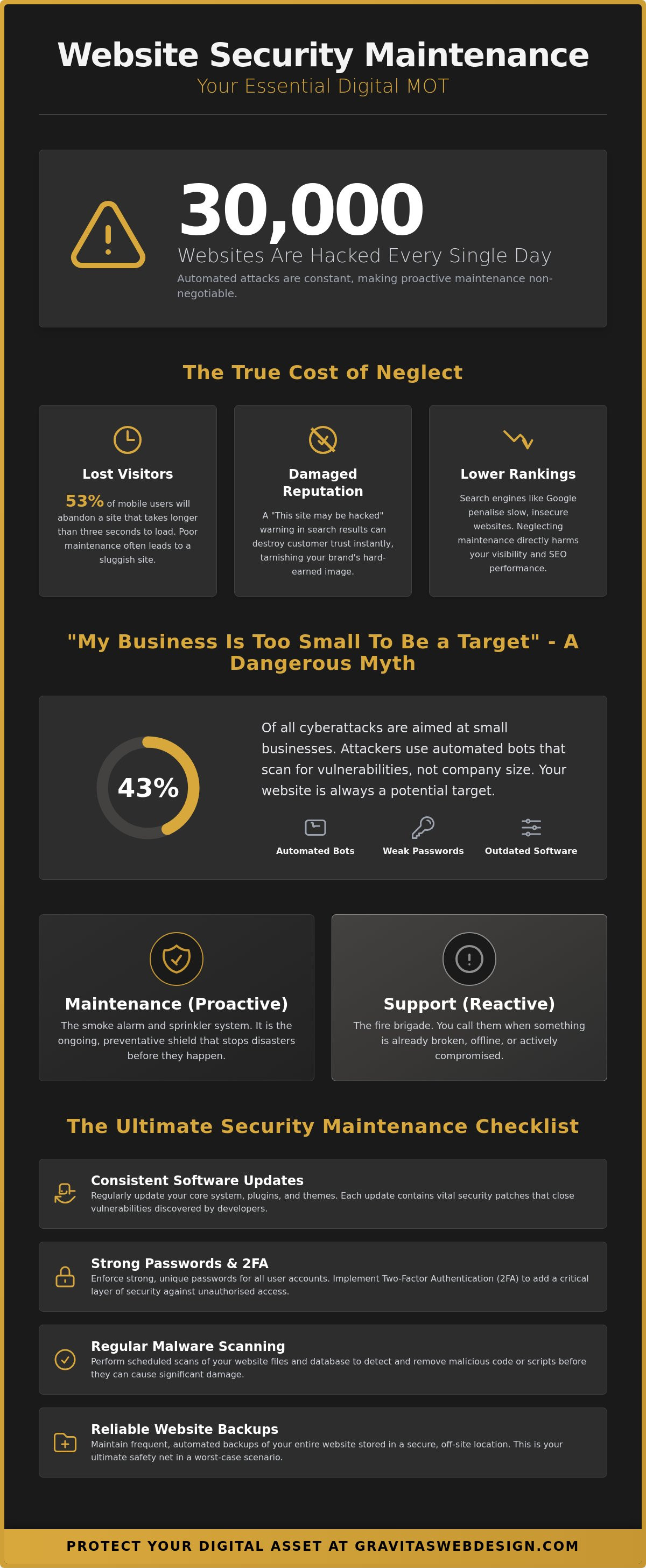
Did you know that 30,000 websites are hacked every single day? It’s a staggering number that makes that little “update required” notification on your dashboard feel a lot more urgent than a simple bit of admin. We know the anxiety of seeing those alerts and wondering if clicking a button will break your entire site or, worse, if ignoring it will leave your customer data exposed. You’ve spent hours making your site look perfect; the last thing you want is a security breach to tarnish your hard-earned reputation. Consistent website security maintenance is simply the digital equivalent of locking your shop front and checking the alarms before you head home for the night.
We understand that you’re a business owner, not a full-time security guard. It’s easy to feel overwhelmed by the technical jargon and the constant fear of a digital disaster. This guide is here to help you protect your digital assets and keep everything running smoothly without the usual technical headache. We’ll provide a clear, jargon-free checklist of essential tasks that you can follow yourself or delegate to a partner. You’ll gain the peace of mind that comes with knowing your site is secure, leaving you free to focus on growing your brand and serving your customers.
Key Takeaways
- Learn why a “Digital MOT” is the secret to catching small glitches before they turn into expensive, site-breaking disasters.
- Understand how to outsmart automated bots that do not care about your brand name, only the outdated software you might be running.
- Discover why bespoke web design offers a much smaller “target” for hackers than the bloated, generic templates used by millions of other sites.
- Follow a simple, repeatable checklist for website security maintenance to keep your digital asset safe and your customer trust intact.
- Weigh up the risks of DIY maintenance against the ease of a professional service to see which path best fits your business goals.
What is website security maintenance (and why does it feel so daunting?)
Imagine your website is a high-end storefront in the centre of Birmingham or a sleek office in the heart of London. You have spent months perfecting the bespoke web design, and it looks stunning. But if the locks are rusty and the windows don’t quite shut, that professional pride is at risk. Let’s be honest; website security maintenance isn’t a one-off event. It is the ongoing rhythm of digital hygiene. Think of it as a “Digital MOT”. You wouldn’t dream of driving a car for three years without checking the brakes or the oil, so why do we expect a website to run perfectly without a regular look under the bonnet?
Whether you are courting clients amongst the glass towers of the capital or the bustling creative quarters of the Midlands, your website is often the very first handshake a prospect experiences. There is a massive difference between “it looks fine on my screen” and “it is actually secure behind the scenes”. A site can look beautiful whilst a malicious script is quietly harvesting data in the background. Understanding application security principles is vital because hackers aren’t just looking at your homepage; they are probing the code for tiny cracks that you cannot see without the right tools.
The true cost of neglecting your digital asset
Neglect is a quiet killer. Beyond the nightmare of a total hack, poor maintenance slows your site down to a crawl. We know that 53% of mobile users will abandon a site that takes longer than three seconds to load, and Google’s algorithms are just as impatient. If your site is sluggish, your SEO rankings will tank. Then there is the emotional toll. Seeing a “This site may be hacked” warning next to your brand in search results is a gut-punch that kills customer trust instantly. The “set it and forget it” approach is a dangerous myth in the modern web landscape; your digital presence needs consistent care to stay visible and viable.
Security vs Support: Knowing the difference
It is easy to get these two confused, but the distinction matters for your peace of mind. Think of technical support as the fire brigade; you call them when something is already ablaze or broken. Maintenance, however, is the smoke alarm and the sprinkler system. It is about prevention rather than cure. You need both to ensure long-term performance, but focusing on the former without the latter is like waiting for a flood before checking your pipes. Website security maintenance is the proactive shield that keeps your brand’s hard-earned reputation safe from the chaos of the open web.
The “Silent Killers” of business website security
“I’m too small for a hacker to bother with.” We hear it all the time. It’s a comforting thought, isn’t it? Sadly, it’s also a total myth. According to the Verizon DBIR, 43% of cyberattacks actually target small businesses. These attacks aren’t usually personal. They aren’t hooded figures in dark rooms typing your specific company name into a terminal. Instead, they are automated bots. These digital scavengers roam the web 24/7, testing thousands of sites every minute for a specific weakness. They don’t care about your turnover or your lovely logo; they only care about your vulnerabilities. If your website security maintenance has slipped, you’ve essentially left the back door wide open for a robot burglar.
Then there’s the human element. Using “Password123” or your dog’s name isn’t just a bit lazy; it’s an invitation for trouble. Without two-factor authentication (2FA), a single leaked password is all it takes to lose control of your entire digital presence. It’s a silent killer because you won’t know there’s a problem until your customers start receiving spam emails from your account or your site begins redirecting to dodgy corners of the internet.
Outdated software: The open window for hackers
Think of your website’s plugins and themes as the bricks and mortar of your shop. Over time, hackers find tiny cracks in those bricks. Developers then release “updates” which are actually security patches to fill those holes. If you have “abandoned” plugins that haven’t been touched in months, you’re effectively living in a house with missing windows. Following best practices for website management means treating every update notification as an urgent repair. And please, steer clear of “nulled” or free versions of premium tools. These are often pre-loaded with malware (it’s how they stay free), which is a bit like accepting a free security camera from a known thief.
The hidden threat of poor hosting environments
We all love a bargain, but “cheap as chips” hosting is often a false economy. When you’re on a bargain-basement shared server, you’re sharing space with hundreds of other sites. If one of those sites is poorly maintained and gets hacked, the infection can spread through the server to yours. It’s why robust website security maintenance includes choosing a host with server-side firewalls and proactive scanning. Investing in premium WordPress hosting UK means your site lives in a clean, high-performance environment rather than a crowded shared server where a neighbour’s poor security can become your problem. This is where bespoke web design in Birmingham comes into its own. By building on clean, custom infrastructure rather than clunky, generic templates, you significantly reduce the “noise” that attracts bots in the first place. If you’re feeling a bit exposed, it might be time to chat about a more secure setup for your brand.
Bespoke vs Template: Why custom builds have the security edge
If you buy a popular off-the-shelf theme, you aren’t just buying a design. You’re buying a house that thousands of other people also own, all with identical locks. Hackers love this. They spend their time finding one single “master key” that fits every one of those doors. This is the “Common Target” problem. When a vulnerability is found in a theme used by a million sites, every one of those businesses is suddenly at risk. With bespoke web design, your digital home is unique. There is no master key because the locks were made just for you, making the job of website security maintenance much more effective from the start.
Generic templates often suffer from “code bloat”. To appeal to the widest possible audience, they include every feature under the sun, most of which you’ll never use. Every unnecessary line of code is a potential backdoor for a malicious script. By contrast, bespoke builds are lean and transparent. We only include the code your business actually needs. You aren’t constantly patching holes in features you didn’t even want in the first place. It is the difference between maintaining a simple, sturdy gate and trying to secure a fence made of a thousand different mismatched parts.
The vulnerability of generic “off-the-shelf” themes
It’s a numbers game for cyber-criminals. If they find a flaw in a theme sold on a massive marketplace, they can use automated tools to find every site using it. One security flaw can expose millions of websites in a single afternoon. This is often compounded by “all-in-one” plugins that try to be a Swiss Army knife for your site. Whilst they seem convenient, they often create complex conflicts that are a nightmare for website security maintenance. In the digital world, simple, bespoke code is almost always the most secure code.
Tailored security protocols for your specific business
Custom builds allow us to move the goalposts. Instead of your login area being at a standard address where every bot looks first, we can hide it away. We can change database prefixes and implement specific protocols that align with FTC cybersecurity basics. At Gravitas, we believe in “security by design”. We build these defences into the foundation of your site from day one. This means your backup schedules and defensive layers are tailored specifically to how your business operates. You get a site that requires less “fiddling” and provides more professional oversight, giving you back the time to focus on what you do best.
The Ultimate Website Security Maintenance Checklist
We have covered why your site is a target and why bespoke builds give you a head start. Now, let’s get into the nitty-gritty. Most business owners feel a bit of a headache when they think about technical chores, but website security maintenance is much easier when you have a rhythm. Think of this as your digital cleaning rota. It keeps the dust bunnies out and the burglars at bay. If you follow this schedule, you won’t just be reacting to disasters; you will be preventing them before they even start.
- Daily: Uptime monitoring and automated security scans.
- Weekly: Core software and plugin updates (always backup first).
- Monthly: Full database optimisation and checking for broken links.
- Quarterly: Reviewing user permissions and updating all passwords.
- Annual: Renewing SSL certificates and reviewing your overall hosting performance.
Critical daily and weekly tasks for the proactive owner
You shouldn’t have to manually check if your site is still standing every morning. Set up automated alerts so you are the first to know if the site goes down. This allows you to fix issues before your customers even notice. When it comes to the weekly “update” button, follow the golden rule: never click update without a full, fresh backup. Software updates are essential security patches, but they can occasionally clash. Having a safety net means a five-minute task doesn’t turn into a weekend-long recovery project. Keep an eye out for unusual traffic patterns too; a sudden spike in failed login attempts often signals an automated brute-force attack.
Monthly and quarterly “Deep Cleans”
It’s tempting to leave deactivated plugins sitting there “just in case”, but these are a security risk. If a plugin isn’t active, delete it. Even dormant code can be exploited by a clever bot. Every month, check your SSL certificate status. That little padlock icon in the browser is non-negotiable; no “Not Secure” warnings should ever greet your visitors. Every three months, take a look at your user list. If a former employee or a one-time contractor still has admin access, remove them immediately. It’s a simple step that closes a massive potential backdoor.
Content and link integrity
Broken links are more than just an annoyance for your London visitors; they signal to Google that your site is neglected. Use a crawler tool to find and fix 404 errors regularly. Whilst you are at it, send a test message through your contact forms. You would be surprised how many businesses miss out on leads because a simple form stopped reaching their inbox. This kind of regular check-up is a vital part of SEO for service businesses. A healthy, secure site is a site that ranks well. If this all sounds like a bit too much admin for your busy schedule, we can take the security maintenance off your plate so you can get back to business.
DIY vs Professional Maintenance: Which is right for you?
So, you have seen the checklist. You are probably sat there wondering if you can just handle this yourself on a quiet Sunday evening whilst the kettle boils. The honest answer? It depends. If you are running a tiny, static site that rarely changes, DIY might be a viable option. However, for most growing firms, the “Hidden Time Sink” is a very real threat. Website security maintenance is not just about clicking a button. It is about knowing what to do when that button causes everything to disappear. Your time is the most valuable asset in your business; spending it squinting at code instead of closing deals is a high price to pay.
There is also a massive financial gap between prevention and cure. According to industry data, the average cost to recover a hacked website ranges from $3,000 to $25,000, depending on the damage done. When you compare that to the manageable cost of regular, professional oversight, the “do it yourself” approach starts to look like a bit of a gamble. We believe in radical transparency: you can certainly learn to do this, but do you actually want to? Most of our clients prefer the peace of mind that comes with knowing the heavy lifting is handled by a partner who actually enjoys the technical bits.
The risks of the “DIY Disaster”
Have you ever experienced the “White Screen of Death”? It is that heart-stopping moment when an update goes wrong and your entire site turns into a blank, white void. Without a recent backup and the knowledge to restore it, you are looking at significant downtime and a very stressful afternoon. This is where the value of a straight-talking partner becomes clear. When things go sideways, you don’t want to be stuck in a support queue with a distant vendor. You want a human connection with someone who can fix the problem before your customers even realise there was one.
How Gravitas handles your website maintenance
We pride ourselves on being the antidote to industry-standard awkwardness. We don’t hide behind confusing jargon or complex bureaucracy. Our process is simple: we provide premium WordPress hosting UK environments and proactive website security maintenance tailored specifically for firms in Lichfield, Sutton Coldfield, and beyond. For businesses in the region, our dedicated WordPress maintenance services Lichfield are designed to keep your digital reputation intact and your site running at its very best. We treat your digital presence with the same professional pride that you do. By taking the tech off your plate, we allow you to focus on the parts of your business that actually bring you joy. If you are ready to stop worrying about your dashboard and start focusing on your growth, we should probably have a chat. Let us take the tech off your plate so you can get back to doing what you do best.
Take the stress out of your digital storefront
Your website is far more than just a collection of code; it is the digital face of your hard work and professional pride. We have explored how automated bots do not discriminate based on business size whilst a bespoke build offers a much sturdier foundation than a generic, bloated template. By moving from reactive repairs to a rhythmic routine of website security maintenance, you transform your site from a source of anxiety into a high-performance asset that works as hard as you do.
At Gravitas, we have championed radical transparency since our founding. We provide dedicated local support for businesses amongst the communities of Birmingham and Sutton Coldfield, ensuring your site lives in a secure, high-performance hosting environment as standard. You deserve to feel proud of your online presence without the constant “update” headache. Ready to see where you stand? Get a jargon-free website health check today and let us help you keep your digital doors firmly locked. You have built something brilliant; let’s make sure it stays that way.
Frequently Asked Questions
How often should I really be performing website security maintenance?
You should be thinking about it every day through automated scans and uptime monitoring. Weekly checks for core software and plugin updates are the absolute minimum to keep things tidy. Think of it like brushing your teeth; skipping a day might not cause a cavity immediately, but neglect it for a month and you’re asking for trouble. Consistent website security maintenance ensures those small tasks don’t pile up into a massive technical debt.
Can I just use a security plugin and forget about the rest?
Not quite; a plugin is a helpful tool, but it isn’t a silver bullet. Plugins themselves can become vulnerabilities if they aren’t updated or if they clash with other parts of your site. You need a holistic approach that includes secure hosting, strong password hygiene, and regular backups. Relying solely on a plugin is like putting a fancy lock on a door but leaving the spare key under the mat.
What is the most common way small business websites get hacked?
Outdated software is the biggest culprit, with 83% of compromised sites running older versions of their core files or plugins. Hackers use automated bots to sniff out these known vulnerabilities across the web. Weak passwords and a lack of two-factor authentication (2FA) are the other major entry points. These silent killers allow bots to walk straight through your front door without breaking a sweat.
Is bespoke web design actually more secure than using WordPress?
It can be, primarily because bespoke builds avoid code bloat and aren’t as tempting for automated bot attacks. WordPress is a fantastic tool, but because it powers 43% of the web, it’s a massive target for hackers. A custom-coded site doesn’t have the same common target problem. You get a leaner, more transparent foundation where every line of code serves a specific purpose for your business.
What should I do immediately if I think my website has been compromised?
Change your administrative passwords immediately and alert your hosting provider. You should also check your most recent clean backup to see if a restoration is possible. Don’t try to clean the files yourself unless you know exactly what you’re looking for; malicious code can be incredibly well-hidden. Contact a professional to perform a deep scan and identify how the breach occurred so you can patch the hole.
Does website maintenance affect my Google search rankings?
Absolutely, as Google prioritises sites that are fast, reliable, and secure. If your site is sluggish due to poor optimisation or if it gets flagged as hacked in search results, your rankings will plummet. Users also tend to bounce away from sites that take longer than three seconds to load. Proactive website security maintenance keeps your performance high and your reputation with search engines intact.
How much does professional website security maintenance typically cost in the UK?
Costs in the UK vary significantly depending on the size of your site and the level of support you need. You should look for a plan that covers regular updates, secure hosting, and proactive monitoring rather than just a fix it when it breaks service. Some providers offer monthly retainers whilst others include maintenance as part of a hosting package. It’s best to check what specific tasks are included to ensure you aren’t paying for fluff.
Will my website be “down” whilst maintenance is being carried out?
No, your site should stay live whilst most routine tasks are performed. We usually carry out updates during low-traffic periods or use a staging environment to test changes before they go live on your main site. This prevents any unexpected White Screen of Death moments from affecting your customers. If a major update requires a few minutes of downtime, it’s always planned and handled as quickly as possible.